


You've polished the subject line, checked the campaign links, and scheduled the send. Then the first report arrives: hard bounces are climbing, valid prospects aren't reaching inboxes, and your team is wondering whether the problem sits in the copy or the list. Often, the message is fine. The data needs attention first.
Bulk email verification online gives teams a practical way to assess many addresses before they become sending problems. The important shift is to treat verification as a layered confidence system, not a simple pass or fail filter. Syntax, domain records, disposable-email signals, SMTP responses, and catch-all behavior each answer a different question.
This guide follows that logic from the first list upload to an ongoing hygiene routine. You'll see what each check can prove, where accuracy becomes uncertain, how to compare providers, and how to connect verification with the tools your team already uses.
Why Bulk Email Verification Matters Before You Hit Send
A campaign manager exports a CRM list, removes obvious duplicates, and uploads the file to an email platform. The addresses look plausible. Names are filled in, domains appear familiar, and the campaign is ready. After sending, the bounce report reveals that some mailboxes no longer exist, some domains are misconfigured, and others belong to temporary services that were never intended for lasting communication.
That failure creates more than a messy report. Your team pays to process contacts that can't receive messages, sales reps waste time following dead leads, and repeated hard bounces can weaken the reputation associated with your sending infrastructure. Industry guidance places acceptable bounce rates below about 2%, with best-in-class senders targeting well under 1%. Sustained rates above roughly 3% to 5% can materially damage deliverability, as explained in Campaigner's guidance on reducing bounce rates.
Practical rule: Treat verification as a pre-send safety check, not as a rescue operation after the campaign fails.
The scale of the risk is easy to underestimate. A 2025 list-quality report found that 80.94% of addresses were valid and safe to send, while 11.7% were invalid hard-bounce addresses and 7.9% were risky addresses, including spam traps or disposable emails. Together, 19.6%, nearly one in five records, could damage deliverability if a sender treated the whole list as equally safe. The report's breakdown of invalid addresses also included 77.76% nonexistent users, 14.47% invalid domains, and 7.77% basic syntax errors (SafetyMails email list quality report).
Who benefits most from verification
Bulk verification is especially useful when teams work with:
- Marketing databases: Older subscribers and imported contacts can decay without obvious warning.
- Sales lists: B2B data often includes role accounts, catch-all domains, and contacts who have changed jobs.
- Signup flows: Product teams can block disposable or malformed addresses before they enter the CRM.
- Agencies: Client lists need repeatable checks and clear exports before campaigns go live.
A cleaner list won't guarantee engagement or inbox placement. It does give your sending decisions a stronger foundation and helps you protect sender reputation before bad records become campaign signals.
What Bulk Email Verification Online Really Means
Checking one address is a quick diagnostic. Checking a large list is an operational process with files, queues, result categories, and decisions about what happens next.
Think of a postal sorting center. A clerk checking one envelope can inspect its address manually. A center handling thousands of envelopes needs a sequence. It first rejects unreadable labels, checks whether the destination exists, separates special cases, and routes uncertain items for additional review. Bulk email verification online follows the same general idea.
From one address to a working batch
A useful bulk workflow has four stages:
- Prepare the source list. Export the addresses from a CRM, spreadsheet, registration database, or campaign platform.
- Submit the batch. The service processes the records through a queue rather than requiring your team to check each address individually.
- Review categorized results. Instead of one vague answer, you should receive statuses such as valid, invalid, catch-all, and risky.
- Export decisions. Keep the usable records, isolate uncertain ones, and suppress addresses that pose a clear sending risk.
The distinction matters because scale changes what “fast” and “accurate” mean. A one-off checker can return an answer for a single address, but a bulk workflow must preserve row-level identity, report progress, handle temporary provider responses, and produce a file your team can safely re-import.
The underlying pipeline normally combines syntax validation, DNS and MX lookup, disposable detection, and SMTP probing. These checks don't all carry equal certainty. A syntactically correct address may point to a nonexistent domain, while a mailbox on a catch-all domain may accept a server conversation without proving that the named user exists.
BillionVerify is a professional email verification service built to solve one problem: bad email data costs businesses money. Its relevance to bulk work is the ability to turn a large address file into structured outcomes that a marketing, sales, or operations team can act on.
Why categories beat a binary answer
A binary “valid” label hides useful distinctions. A valid mailbox on a normal domain may be a reasonable sending candidate. A catch-all result needs more caution because the server accepts mail for addresses it may not host. A disposable address may work today but still be unsuitable for a long-term relationship.
The best interpretation is therefore confidence-based:
- Valid: Strong signals support sending, but normal list policies still apply.
- Invalid: The address fails one or more fundamental checks.
- Catch-all: The domain accepts broad mailbox queries, so existence remains uncertain.
- Risky: The address or provider behavior suggests increased operational or reputation risk.
That structure helps teams avoid two common mistakes, removing every uncertain address automatically or sending to every record that passes a format check.
How Verification Works From Syntax to SMTP
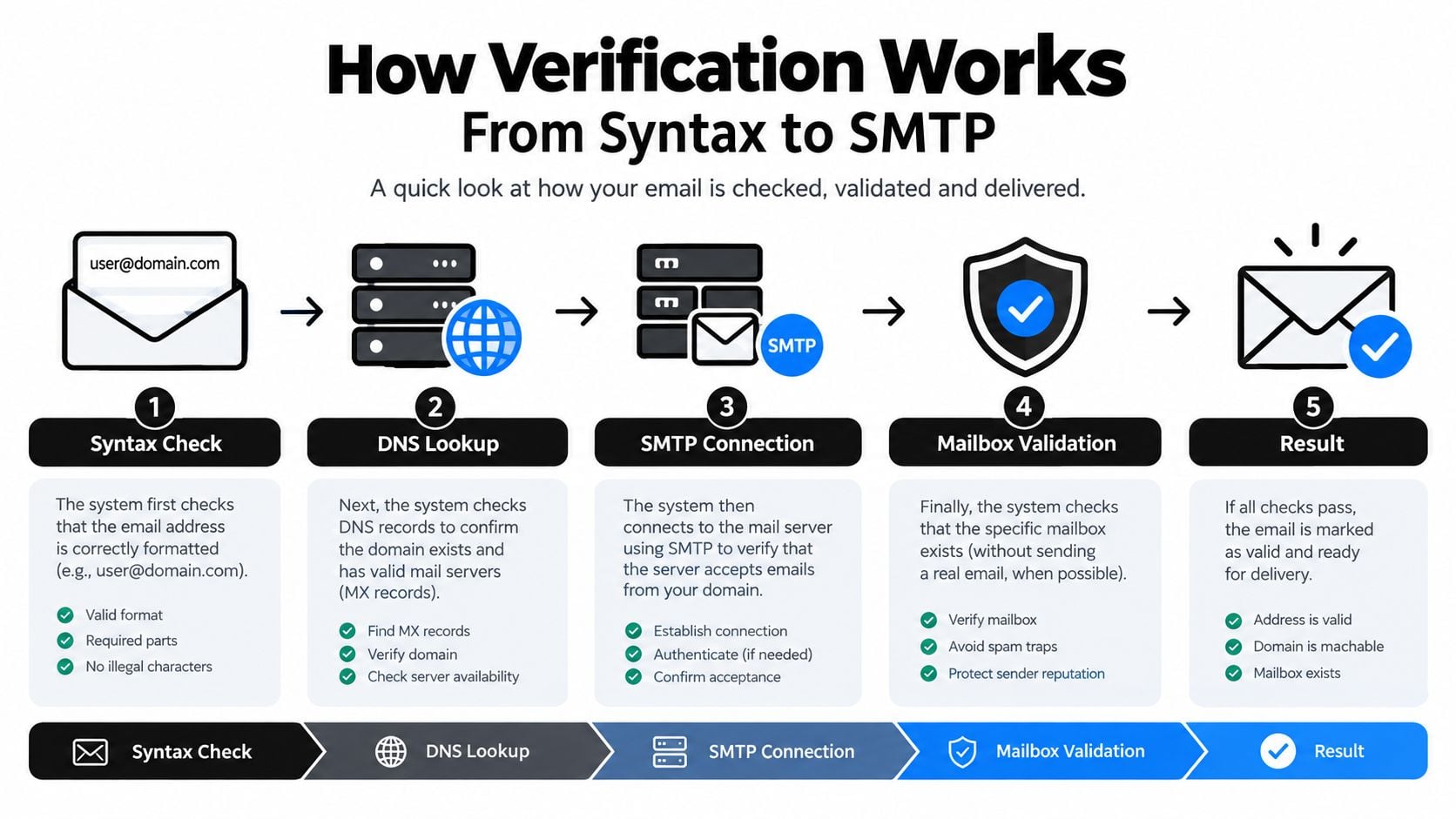
Verification works best as a chain of evidence. Each layer narrows the possibilities, but none should be treated as a universal truth.
Syntax starts with the address itself
Syntax validation looks for structural problems such as missing components, illegal spacing, or an incorrectly formed domain section. It answers a limited question: does this string resemble an email address?
That makes syntax useful for removing obvious junk before deeper checks. It can't confirm that the domain exists, that mail servers are configured, or that a person controls the mailbox. A perfectly formatted address can still produce a hard bounce.
DNS and MX checks test the destination
A domain lookup checks whether the address's destination has the records needed to receive mail. MX validation is more informative than a visual domain check because it examines the receiving setup rather than relying on familiarity with the domain name. For a plain explanation of how MX validation protects deliverability, think of it as checking whether the building has a functioning mailroom before asking whether a particular employee works there.
A failed domain or MX result provides a strong reason to suppress the address. A successful result only means the destination appears configured. It doesn't establish that the named mailbox exists.
Disposable detection identifies temporary intent
Disposable providers create inboxes designed for short-lived use. They may accept mail, but they often don't represent a stable subscriber, customer, or business contact. Verification services maintain provider lists to identify throwaway domains, with examples including 10MinuteMail, Guerrilla Mail, and Mailinator (Bulk Email Checker's disposable email explanation).
This is why “mailbox exists” and “good marketing contact” aren't interchangeable judgments. Disposable detection adds context that a basic server check can't provide.
SMTP probing supplies a live signal
An SMTP-level check communicates with the receiving mail system to assess whether it can respond to a mailbox query. It can be highly effective for syntax, DNS, and many corporate mailboxes, but providers may obscure mailbox existence or deliberately accept all queries. SMTP.com's technical overview describes SMTP as a strong signal rather than absolute proof, especially for catch-all domains and privacy-conscious providers.
Catch-all behavior is the critical exception. If a domain accepts mail for almost any mailbox name, the verifier can't confidently prove that a specific recipient exists without sending a message. A mature workflow combines SMTP results with MX presence, provider behavior, catch-all classification, and pattern analysis, then assigns a confidence-oriented status.
A verification result should tell you what the system knows, what it suspects, and what remains uncertain.
No single layer can carry the whole decision. Syntax catches malformed input, DNS and MX checks validate destination infrastructure, disposable detection identifies temporary providers, and SMTP probing adds mailbox-level evidence. Together, they create a more useful picture of list quality than any isolated check.
How to Choose the Right Online Verification Provider
Provider selection shouldn't begin with the largest advertised accuracy number. It should begin with your list composition, your tolerance for uncertainty, and the action you need to take after each result.
A B2B list containing corporate domains and catch-all addresses tests a provider differently from a consumer newsletter list. If your vendor performs well on ordinary consumer mailboxes but labels too many business addresses as certain, the headline result won't predict your campaign experience.
Compare the evidence, not just the promise
Independent benchmark-style guidance suggests that the gap between marketing claims and live-sending performance can be 4 to 8 percentage points, with real-world accuracy landing closer to about 95% on strong tools rather than 99% during actual campaigns (Overloop's email verification guide). That doesn't make verification ineffective. It shows why buyers should test representative samples from their own database.
| Criteria | What to Look For | Why It Matters |
|---|---|---|
| Catch-all handling | Separate catch-all status or confidence scoring | Prevents uncertain domains from appearing fully validated |
| Corporate-domain behavior | Results tested on B2B and enterprise addresses | Reveals how the provider handles obscured mailbox responses |
| Layer coverage | Syntax, MX, disposable, SMTP, and risk signals | Reduces dependence on one imperfect test |
| Result detail | Structured fields with reasons and check outcomes | Makes suppression and review rules auditable |
| Batch performance | Queue status, progress reporting, and stable exports | Keeps large list operations manageable |
| Transparency | Clear unknown, risky, and limitation categories | Helps teams avoid false certainty |
Speed matters, but only after the result model is clear. A fast system that returns “valid” without explaining catch-all or SMTP uncertainty can create more operational risk than a slower system with interpretable statuses.
Check the output before committing
Ask for a sample export or API response. Look for fields that let you distinguish an invalid domain from a nonexistent mailbox, and a disposable address from an uncertain catch-all result. If the provider offers only one final label, your team may struggle to build sensible rules.
Provider workflows also deserve attention. Review SleekPost workflow advice for a broader perspective on evaluating third-party tools within an existing marketing stack, rather than judging an isolated feature list.
Finally, run a controlled test using a small, representative slice of your actual data. Include consumer addresses, corporate domains, role accounts, older records, and known edge cases. Then compare the output with later sending behavior, while remembering that no verifier can eliminate every uncertainty.
For a structured way to examine verification performance, use an Email Verification Benchmark as part of your evaluation process. The strongest choice is the provider whose confidence model matches your list, not necessarily the one with the most impressive headline.
Cleaning Your List With CSV Uploads and API Workflows
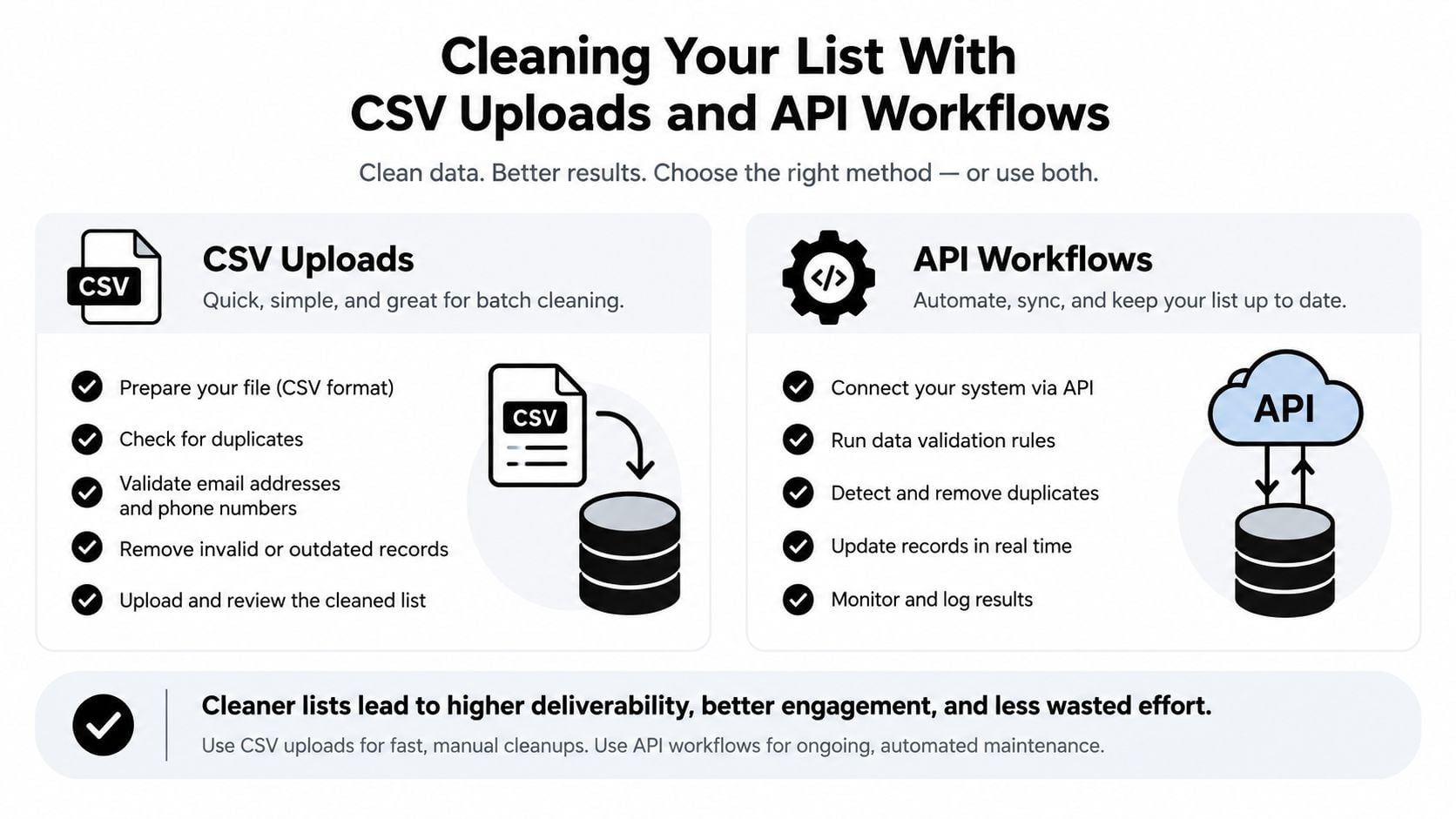
Teams need two workflows. A CSV upload handles a scheduled cleanup, while an API protects the flow of new data as it enters a form, CRM, or application.
The file-based workflow
Start by creating a clean source file. Keep the email address in its own column, preserve a stable contact identifier, and avoid overwriting the original export. Depending on the service, accepted formats can include CSV, XLS, XLSX, and TXT.
A practical sequence looks like this:
- Export a copy. Preserve the source file so you can audit changes.
- Upload the batch. Confirm the platform recognizes the email column and begins processing.
- Watch progress. Use status updates or notifications to know when the job finishes.
- Review categories. Separate valid, invalid, catch-all, and risky records.
- Apply policy. Suppress invalid and clearly risky addresses, review catch-all records according to your audience and sending history.
- Export the result. Re-import only the approved records into the CRM or sending platform.
One documented bulk API workflow accepts a batch of up to 5,000 addresses, returns a task_id immediately, tracks progress, and produces categories including valid, invalid, catch-all, and risky. It also supports CSV, XLS, XLSX, and TXT uploads and exposes syntax, MX, blacklist, and SMTP checks (EmailVerify.io bulk verification API).
The API workflow
An API is the better fit when new records arrive continuously. Your application can submit an address during signup, wait for the response, and decide whether to accept, flag, or reject the record before it reaches downstream systems.
For scheduled hygiene, use task-based batch processing rather than sending thousands of synchronous requests at once. Store the task identifier, poll or receive completion status, and write the categorized result back to the source record. That preserves a history of what was checked and when.
Operational habit: Keep verification status, result reason, and verification date beside the address. A clean list without a timestamp soon becomes an unexplained list.
Make re-verification routine
Cleaning once isn't enough. Contacts change jobs, domains expire, mailboxes close, and old records become risky. Recent benchmark coverage places average bounce rates in 2025 and 2026 summaries around 2.0% to 2.48%, while the same coverage says bounce rates above 3% can trigger deliverability penalties (Verified.email benchmark coverage).
Set the rhythm according to your sending pattern. High-frequency senders should check new records at entry and revisit older segments regularly. Less active teams can verify before major campaigns and after substantial CRM imports. The goal is a repeatable control, supported by cleaning email lists the right way, not a frantic cleanup before every send.
Integrations Pricing and Scaling for Growing Teams
Verification becomes more useful when it sits inside the workflow instead of beside it. A marketing team may upload an existing list, while a product team blocks disposable signups and a sales operations team writes risk categories back to the CRM. Those are different jobs, but they rely on the same confidence signals.
BillionVerify can fit into workflows involving Mailchimp, SendGrid, HubSpot, Salesforce, Klaviyo, Zapier, and Make, according to the publisher's product information. Teams should confirm the current integration details before implementation because platform capabilities and connection methods can change.

Match the workflow to the team
A useful ownership model assigns each point of control to the team closest to the data:
- Product owns entry checks: New signup addresses receive real-time validation before storage.
- Marketing owns campaign readiness: The campaign list is reviewed before a send.
- Sales operations owns CRM hygiene: Imported and aging prospect records receive scheduled checks.
- Agencies own client separation: A whitelabel portal can keep client-facing verification distinct from internal operations.
- Technical teams own automation: API and MCP Server support can connect verification with applications and AI-agent workflows.
Scaling isn't just about processing more addresses. It also means keeping results understandable, limiting duplicate checks, preserving source records, and deciding how uncertain categories should move through the stack.
Evaluate cost as a workflow decision
A free tier with no credit card required can help a team test the process before committing to a broader rollout, based on BillionVerify's published product information. For current terms, review the provider's Best Email Verification Pricing page rather than relying on old comparisons.
The right budget model accounts for more than verification volume. Removing bad records can reduce wasted sends and protect future inbox access, but teams should also consider integration work, review time, data retention, and the frequency of re-checks. A small list that changes constantly may need more automation than a larger, stable database.
Real Results and Your Next Steps to Better Deliverability
The value of bulk verification appears in operational outcomes. Teams send to fewer clearly invalid addresses, investigate uncertain records before committing them to a campaign, and gain a cleaner view of the audience they can reach.
Independent deliverability benchmarks reported an average deliverability rate of 83.1% in 2024, meaning about 16.9% of legitimate marketing emails failed to reach the inbox. Later 2025 to 2026 summaries describe healthy bounce rates below 2% and note that real-time verification can drive bounce rates to around 0.3%, with inbox placement near 95% (deliverability benchmark summaries). These figures don't promise that verification alone will produce the same result for every sender. They show why list quality belongs in the deliverability program alongside authentication, consent, content, engagement, and sending practices.
Use a simple maintenance loop
- Verify at collection: Stop malformed and disposable records before they enter your CRM.
- Verify before major sends: Process the campaign audience and separate invalid, risky, and catch-all results.
- Review exceptions: Decide whether uncertain business addresses need manual confirmation or a lower-risk communication path.
- Record the result: Store the status and check date with the contact.
- Monitor sending data: Compare verification categories with bounce and engagement reports.
- Adjust the cadence: Re-check segments that change quickly or repeatedly produce delivery problems.
Customer stories supplied by BillionVerify report bounce rates dropping below 1%, improved inbox placement, and measurable return on investment from cleaner data. Those outcomes should be treated as reported customer patterns, not as a guaranteed benchmark for every list.
The central lesson is straightforward. Verification isn't a magic label attached to an address forever. It's a confidence score built from several signals, refreshed as your database changes, and connected to decisions your team can explain.
BillionVerify offers bulk list cleaning, real-time verification, CSV processing, structured results, and integrations for teams that want to make email hygiene routine. Visit BillionVerify to assess your list workflow and build verification into the point where new and existing addresses enter your sending system.