


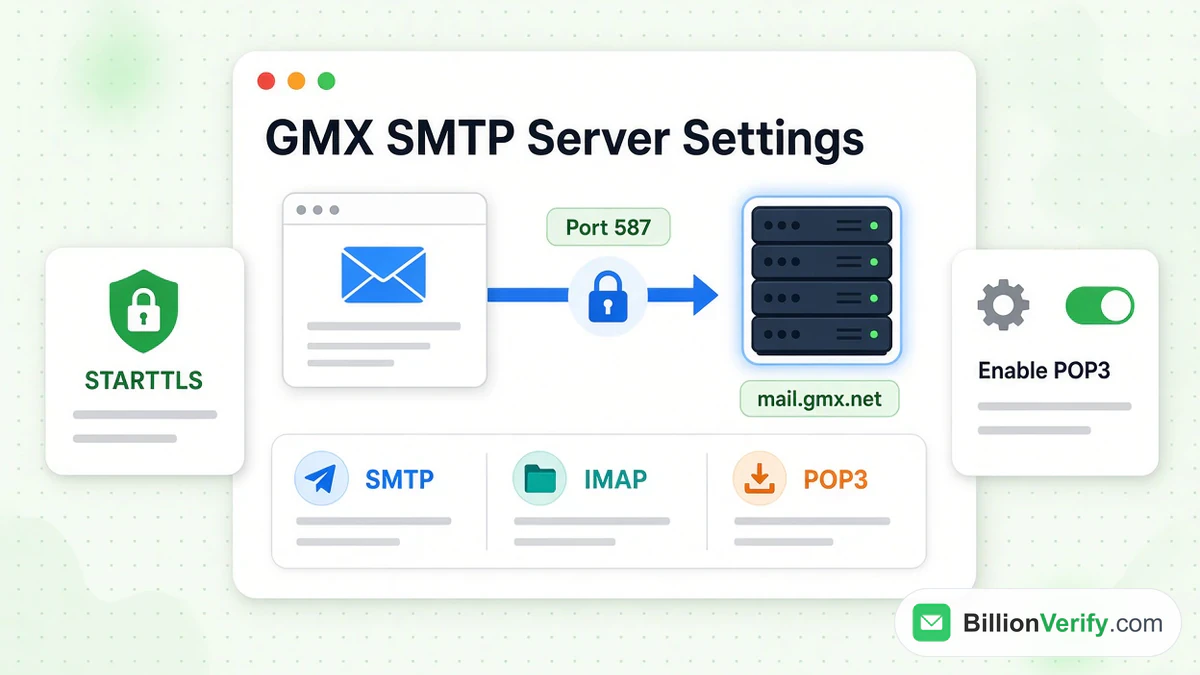
Quick answer for a gmx.net mailbox: GMX SMTP server mail.gmx.net port 587 STARTTLS. Incoming mail comes from imap.gmx.net on port 993, or from pop.gmx.net on port 995. A gmx.com mailbox uses the same ports on servers that end in .com.
None of this works until you enable outside access in the GMX account. GMX leaves it off by default.
This guide lists every incoming and outgoing value for both sites. Then it walks through desktop clients and phones. All values come from GMX's own help centers, hilfe.gmx.net and support.gmx.com, read in October 2026. We are not affiliated with GMX. BillionVerify is an email verification service. For a short definition of the provider, read what GMX is in our glossary. If webmail itself turns you away, use our GMX login guide.
Key facts (checked October 2026):
- GMX SMTP server mail.gmx.net port 587 STARTTLS is the outgoing setting for gmx.net, per hilfe.gmx.net.
- GMX lists imap.gmx.com, pop.gmx.com and mail.gmx.com for gmx.com mailboxes, with mail.gmx.com open on ports 587 and 465, per support.gmx.com.
- Access for outside programs is off by default and turns itself off again after a long period without use, per GMX.
- GMX servers no longer accept TLS 1.0 and 1.1, so a client needs TLS 1.2 or 1.3.
- GMX requires an app password outside Europe, the USA and Canada, and whenever two-factor sign-in is on, per hilfe.gmx.net.
- BillionVerify gives 20 free credits on each day you use it, up to 600 a month, for vetting a list ahead of a campaign.
GMX SMTP Server mail.gmx.net Port 587: The Short Answer
Outgoing mail from a gmx.net mailbox uses one server. Enter mail.gmx.net as the server, port 587, with STARTTLS. The German page accepts TLS, or a plain "encryption" option, as other names for the same protection.
If a program has no STARTTLS choice, pick TLS. If it has neither, tick the encryption box. A second route exists too, on the same host: port 465 and SSL.
A gmx.com mailbox sends through mail.gmx.com instead. The English page lists port 587 for STARTTLS and port 465 for SSL/TLS.
GMX accepts only logged-in sending. The old "SMTP-after-POP" trick is no longer supported. So your program must log in to the outgoing host as well. Outlook 2013 and older call that box "My outgoing server requires authentication".
The login name is your full GMX address. The secret is your normal password, or an application-specific password when one is required.
GMX IMAP, POP3 and SMTP Settings for gmx.net and gmx.com
GMX keeps its server data on two sites. German pages list names ending in .net. English pages show the .com names.
Server Values for gmx.net Mailboxes
Source: GMX Hilfe, "Serverdaten für IMAP und SMTP" and "Serverdaten für POP3 und SMTP".
| Use | Server | Port | Encryption |
|---|---|---|---|
| IMAP (incoming) | imap.gmx.net | 993 | SSL |
| IMAP, if 993 fails | imap.gmx.net | 143 | STARTTLS |
| POP3 (incoming) | pop.gmx.net | 995 | SSL |
| SMTP (outgoing) | mail.gmx.net | 587 | STARTTLS, TLS or encryption |
| SMTP, second route | mail.gmx.net | 465 | SSL |
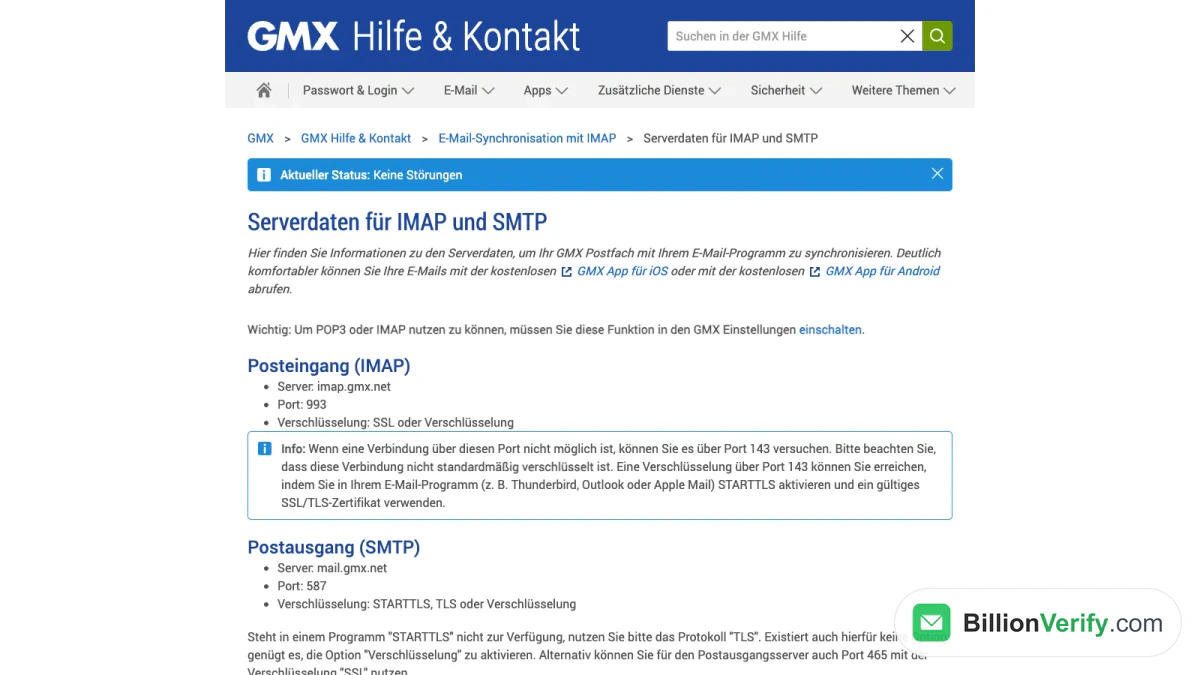
Screenshot: GMX's German help page with the gmx.net values.
Server Values for gmx.com Mailboxes
Source: GMX Help Center, "IMAP Server Data" and "POP3 Server Data".
| Use | Server | Port | Encryption |
|---|---|---|---|
| IMAP (incoming) | imap.gmx.com | 993 | SSL |
| IMAP, port 143 fallback | imap.gmx.com | 143 | STARTTLS |
| POP3 (incoming) | pop.gmx.com | 995 | SSL |
| SMTP (outgoing) | mail.gmx.com | 587 | STARTTLS or encryption |
| SMTP, second route | mail.gmx.com | 465 | SSL/TLS |
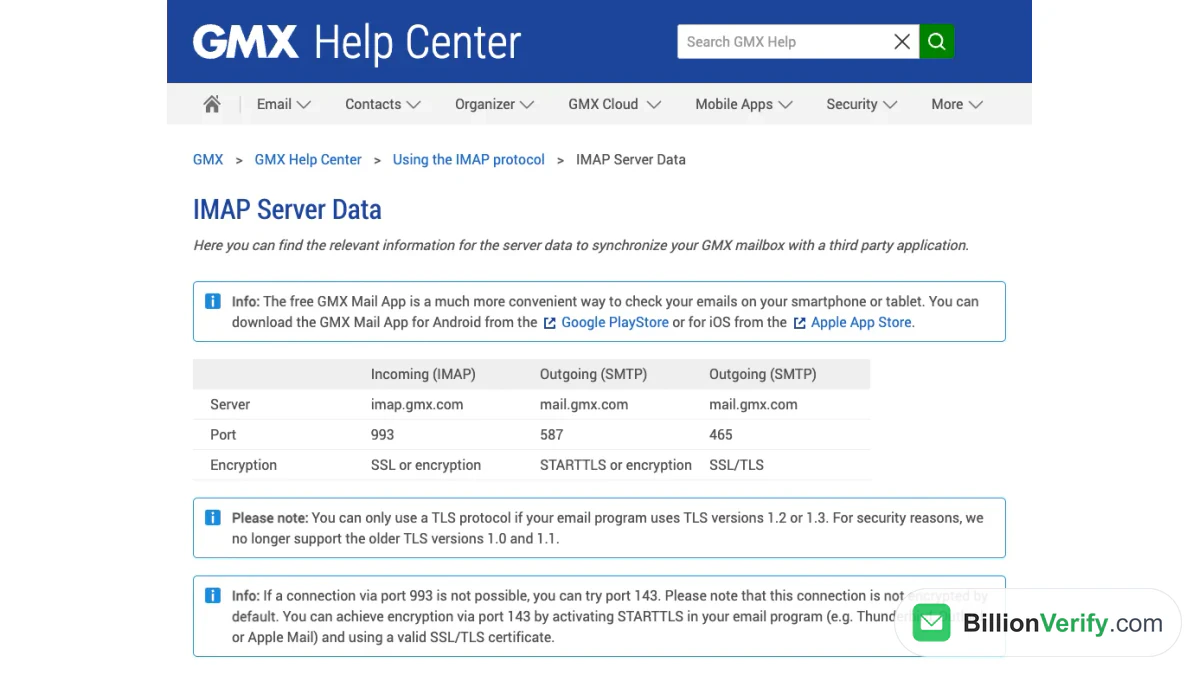
Screenshot: GMX's English help page with the gmx.com values.
Which Table Fits Your Mailbox?
GMX does not publish a rule that ties each address ending to one set of hosts. It ties each set to a help site. Take the table from the site where you open webmail. If you sign in on www.gmx.net, read the first table. If you sign in on www.gmx.com, read the second.
Notes on Ports and Encryption
- Port 143 is not encrypted by default. Turn on STARTTLS in the client, and the host needs a valid certificate.
- Versions 1.0 and 1.1 of TLS are gone. A client that offers only those cannot connect.
- Clients name the options differently. SSL, TLS and "encryption" all mean a protected link.
Turn On POP3 and IMAP in GMX First
Sync through POP3 and IMAP is deactivated by default. No client can connect until you change that in the web version.
On gmx.com, GMX gives these steps:
- Log in to GMX in a browser.
- Open the Email tab and choose Settings.
- Choose POP3 & IMAP.
- Tick "Enable access to this account via POP3 and IMAP".
- Save.
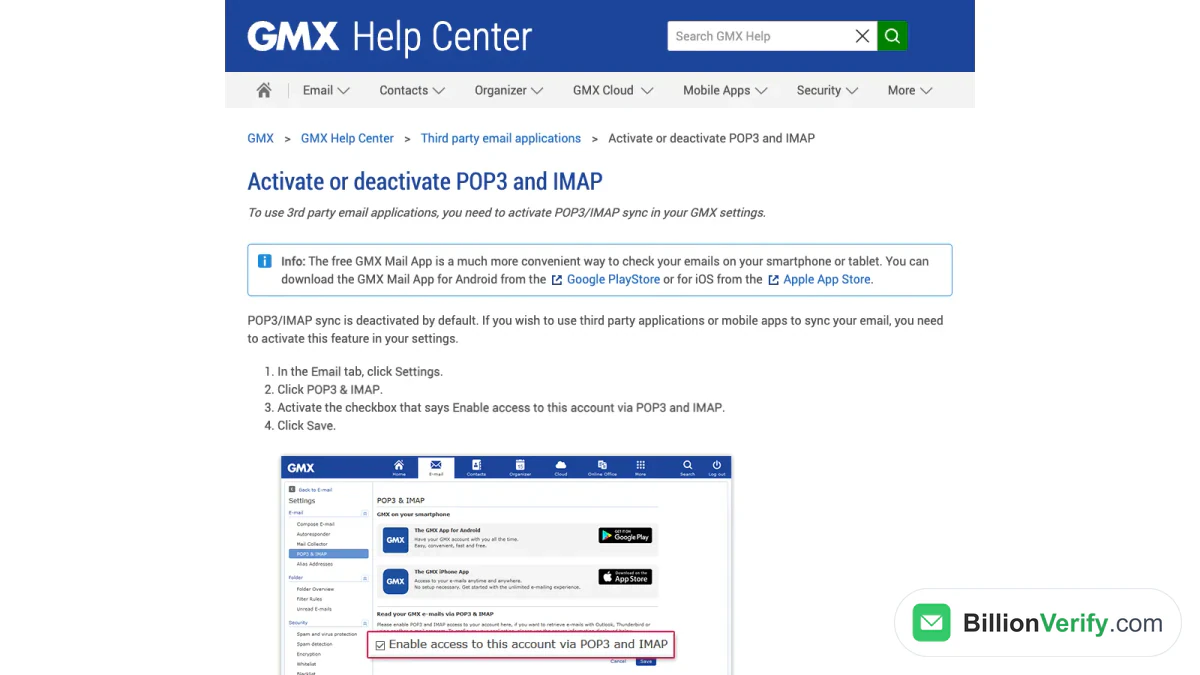
Screenshot: GMX's English page for switching on the setting.
On gmx.net, the German page sends you to the round icon with your initials. Open E-Mail-Einstellungen (email settings), then POP3/IMAP Abruf (retrieval). Tick "POP3 und IMAP Zugriff erlauben" (allow access) and press Speichern (Save).
GMX adds a warning. For security reasons, the switch turns itself off if you leave it unused for a long time. When a client that worked for months suddenly fails, look here first.
Create an Application-Specific Password for Two-Factor Accounts
A second sign-in step keeps outside programs from using your normal password. GMX's answer is a separate password for each program.
On gmx.net:
- Log in on the GMX website and open the menu behind your initials.
- Choose Account verwalten (manage account), then Login & Sicherheit (login and security).
- Choose App-Passwörter (für externe Apps), the section for outside apps, then Neues App-Passwort erstellen (create new).
- Name it after the program and press Weiter (Next).
On gmx.com:
- Log in and open the profile icon at the top right.
- Choose Security Options, then Manage application-specific passwords.
- Choose Create new application-specific password.
- Name it and press Continue.
GMX shows the new string only once, so copy it at once. Paste it into the program in place of your normal password. Where the key facts say GMX requires one, nothing else works.
Set Up GMX in Outlook, Thunderbird, Apple Mail and Phones
Each section follows GMX's own setup page. Do that step first.
GMX in Outlook
GMX's page for Outlook 2016 and 2019 uses the manual route.
- Open File, then Info, then Add account.
- Type your GMX address. Open Advanced options and tick "Let me set up my account manually".
- Press Connect and choose IMAP.
- In the IMAP Account Settings window, enter imap.gmx.net, port 993, and tick "This server requires an encrypted connection (SSL/TLS)".
- For outgoing mail, use GMX SMTP server mail.gmx.net port 587 STARTTLS.
- Press Next, type the password and press Connect.
A gmx.com mailbox follows the same steps with imap.gmx.com and mail.gmx.com, per the English page.
Outlook 2013 and 2010 use a longer form. Pick manual setup and the IMAP type. Enter both host names and the user name. Open More Settings, then the Outgoing Server tab, and tick the authentication box. On the Advanced tab, set 993 with SSL for incoming mail and 587 with TLS for outgoing mail.
GMX in Thunderbird
Thunderbird finds the IMAP and SMTP values by itself.
- Choose Email.
- Choose "Skip this and use my existing email".
- Type name, address and password. Tick Remember password and press Continue.
- Thunderbird detects the settings. Select IMAP and press Done.
- Press Get Mail to sync.
Then link the folders. Right-click the GMX account, open Settings, then Server Settings, and make deleted items move to Trash. Under Copies & Folders, point Sent and Drafts at the GMX folders. GMX notes that Thunderbird's Templates folder has no twin in the GMX mailbox.
GMX in Apple Mail
On a Mac, the GMX page is short.
- In the menu bar, choose Mail, then Add Account.
- Choose Other Mail Account and press Continue.
- Give Mail your name, password and address, then press Sign In.
- If Mail asks, pick IMAP. Enter imap.gmx.com as the incoming host and mail.gmx.com as the outgoing host, then press Sign In again.
GMX's German page says Apple Mail checks the login in the background and builds an IMAP account with matching SMTP values. To link folders, select one, open the Mailbox menu and choose "Use This Mailbox For".
GMX on iPhone
GMX documents its free GMX Mail app for iPhone and iPad, found in the App Store. You sign in with your usual login details, and the app needs no host names. GMX calls the app a much more convenient way to read messages on a phone.
The iPhone's built-in app belongs to Apple, and GMX has no page for it. If you add GMX there as an "Other" account, enter the values from the tables above. That route is our note, not a GMX instruction.
GMX on Android
GMX's own app for Android is free and sits in Google Play. You log in as usual, and the app handles the hosts. It can also sync your GMX address book and calendar to the phone.
Another Android mail app works too. Enter the table values for your site. No GMX page covers third-party apps, so the menus differ by app. For gmx.net, the outgoing line reads GMX SMTP server mail.gmx.net port 587 STARTTLS. An app password is needed when two-factor sign-in is on.
GMX POP3 Settings and the Difference From IMAP
GMX describes the two incoming protocols plainly. IMAP keeps messages on the server and syncs them across devices, so you can read them whenever you are online. POP3 moves messages to your program and then deletes them from the server, unless you change that. Downloaded messages can be read offline, but only in that one program.
For most people, IMAP fits better, because every device shows the same mailbox. Choose POP3 only if you want messages stored on one computer. GMX has a page named "Leaving a Copy in the Mailbox" for POP3 users who still want a copy online.
A POP3 mailbox uses pop.gmx.net, port 995, for gmx.net and pop.gmx.com, port 995, for gmx.com. Sending is the same SMTP host as for IMAP.
Common GMX Connection Errors and Fixes
GMX lists its own causes for failed setups. Work through them in order.
Setup Fails or Nothing Connects
- The access switch is still off in the GMX settings.
- A temporary block or another notice waits in the mailbox. Log in on a computer through the website and read what appears. A client may hide such errors.
- A host name or port is wrong. Compare it with the tables above.
- The client built the setup itself with wrong values. The fix is to delete the entry and add it again by hand.
- A typo sits in the login name or secret. Sign in on the website with the same pair.
- A firewall or virus scanner blocks the connection.
- The client is outdated. Mozilla Thunderbird is the free current choice GMX suggests.
Receiving Works but Sending Fails
GMX's page on sending problems adds more causes:
- The access switch turned itself off after a long break.
- The mailbox or your IP address is blocked, for example after misuse for spam. The reason usually shows right after you log in on the website.
- The GMX SMTP server address in the client is wrong or old, or the client relies on SMTP-after-POP.
- The account asks for a second step, so the client needs a password made for programs.
- The router blocks the mail host. Add pop.gmx.net, imap.gmx.net and mail.gmx.net to the router's allowed list.
The "Unauthorized Sender Address" Message
GMX checks the sender address before it sends. It must belong to the mailbox: the main address, a second address or a fun domain. A foreign sender address is a known spam sign, and GMX no longer allows it.
To fix the error, open the outgoing settings in your client and set the sender to your own GMX one. Or send that other address through its own provider's host.
Messages Come Back as Undeliverable
GMX sorts returned messages into two groups. A code in the 400 range is a temporary problem, and the message usually goes through later. A code in the 500 range means the message cannot arrive until you act.
The causes GMX lists include a typo in the address, a full mailbox at the recipient, an attachment over the recipient's limit, and a block on the receiving side. For a spam block, GMX names a VPN service that many spammers use, link shorteners in the text, and a hacker who sends spam from your account.
GMX Sending Limits
GMX states two size limits for attachments:
- On gmx.com, the maximum attachment size is 50 MB.
- On gmx.net, the limit follows the plan: FreeMail 20 MB, ProMail 50 MB and TopMail 100 MB.
For bigger files, GMX points to its Cloud. Upload the file and send a share link.
The pages we read give no number of messages per day or recipients per message, so this guide gives none. GMX does say that a message to many recipients is often read as spam. The next section covers its advice.
Clean Your List Before You Send From a GMX Account
GMX's German page on mailing many recipients lists tips for avoiding failures. The first is to clean your address lists. Remove addresses that cause returns, plus unknown or deactivated GMX addresses.
GMX's Postmaster site repeats the idea for anyone who delivers to GMX users. It says to send only to active addresses and to remove undeliverable contacts regularly. It adds that many messages to unknown or deactivated addresses can lead to a temporary suspension of the mailing system.
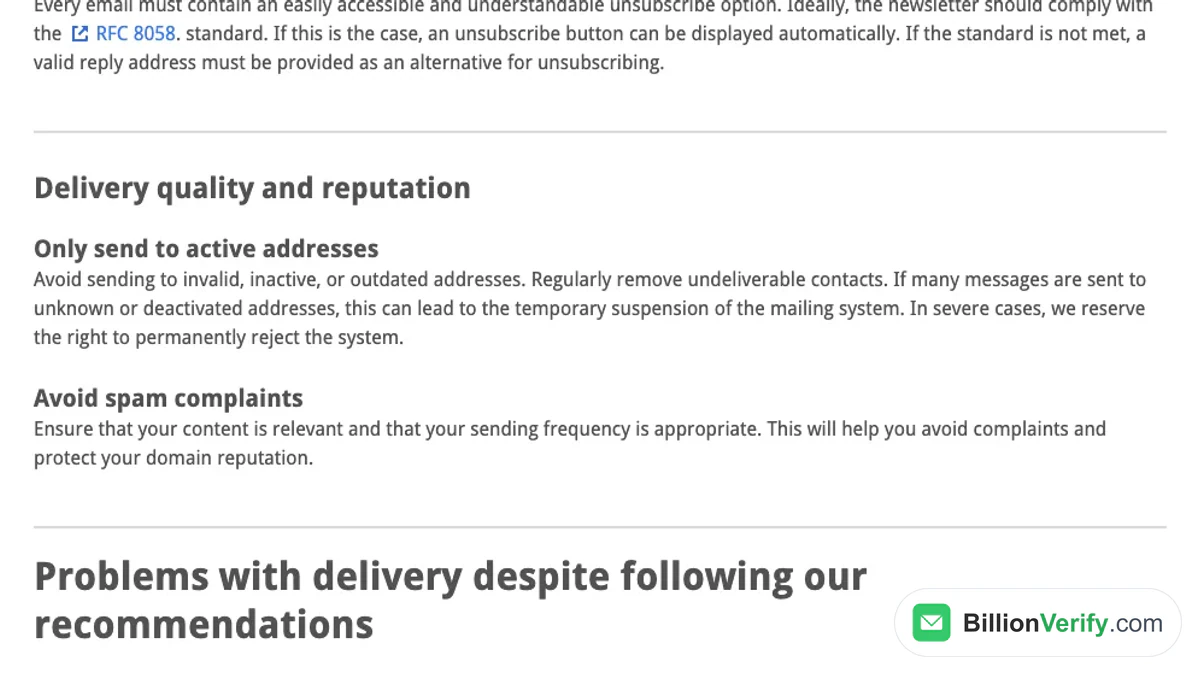
Screenshot: GMX Postmaster, "Delivery quality and reputation".
BillionVerify's bulk email verification takes a CSV or Excel file and sorts each address. It has no row limit, and one file can be up to 20 GB.

BillionVerify bulk email verification runs a whole list in one upload.
What to know before you upload:
- Valid and invalid results cost 1 credit each, and unknown results are free.
- A free re-check is available within 24 hours.
- A catch-all address gets its own label and is never counted as valid.
- Daily use earns 20 free credits, capped at 600 a month. They never expire, and no card is needed.
- A REST API, an MCP server and 25+ integrations are available.
Two more free tools help with the rest of a sheet. Use reverse email lookup to learn about an address you do not recognize. Use verify phone numbers to check whether a number is valid for its country.
FAQs
What is the GMX SMTP server address?
The GMX SMTP server address is mail.gmx.net on gmx.net and mail.gmx.com on gmx.com. Both listen on port 587, and STARTTLS protects the link. The access switch must be on, and the client must also authenticate with the host.
Which port does GMX use for SMTP, 587 or 465?
GMX lists 587 with STARTTLS first, and its Outlook page marks STARTTLS as the recommended choice. The second route GMX names for the same outgoing host is 465 over SSL.
What are the GMX IMAP settings?
The GMX IMAP host is imap.gmx.net on gmx.net and imap.gmx.com on gmx.com. Both use port 993 with SSL. GMX names port 143 as a fallback, and it needs STARTTLS to be encrypted.
Does GMX support POP3?
GMX supports POP3 on pop.gmx.net or pop.gmx.com, port 995, with SSL. The access is off by default, so switch it on under POP3 & IMAP in the account settings first.
What user name and password does a client need?
Type your full GMX address as the name. The secret is your GMX password, and two-factor accounts use an app password instead. A wrong name or secret is a separate cause of failed setups, so check the details on the website.
Why does a client reject my normal GMX password?
A GMX client rejects the normal password when two-factor sign-in is on, because outside programs are blocked and an app password takes its place. The key facts name the regions where the same rule applies. Make one in the account security settings.