



German email providers hand out a free email without a phone or internet contract, and five of them do most of the work in Germany. WEB.DE, GMX, freenet, mail.de and Telekom each let you register in a browser and read your email the same day. The five providers hold between half a gigabyte and a full one on their free plans, and these are the names German users meet first. Paid steps add room, and most of them remove advertising.
This page compares what each German email provider publishes on its own site, read in October 2026. It covers the form, the login you pick, the paid steps and the move to a new email later. We are not affiliated with any of the companies. For the vocabulary, our glossary explains how an address is built.
Key facts (checked October 2026):
- WEB.DE lists FreeMail at no monthly fee, with space for mail and files plus two addresses, per its tariff page.
- GMX offers FreeMail for nothing and adds a separate cloud, while ProMail costs 3,99 €, per its plan overview.
- freenet sells freeMail at 0,00 € with a gigabyte and extra cloud space, paid for by advertising, per its Mail page.
- mail.de runs two free plans: FreeMail with advertising, and FreeMail Zero without ads and with half the storage, per its product page.
- Telekom keeps Freemail at a gigabyte with a ceiling of 100 messages a day, and the package is open to people who are not Telekom customers.
- BillionVerify bills 1 credit for a valid address and 1 for an invalid one, nothing for an unknown, and re-checks free within 24 hours.
What Creating an Email Address Involves
Every address has the same shape: a login, an @ sign, a domain. The part before the @ is yours; the part after it belongs to whoever runs the email, and that domain is the only piece that cannot change afterwards. German email providers issue addresses on their own domain, which is what our glossary calls an email service provider.
Three decisions come before the first click. You choose an email provider, you choose a login, and you decide how you will read the mail: in a browser, in an app, or in a program such as Outlook or Thunderbird. The last choice is reversible. The first two shape the address you keep.
The Form Asks for More Than a Login
German email providers differ sharply in what they ask for. WEB.DE asks for a first name, a last name and a birth date first, uses them to suggest addresses, and later asks for gender and a postal address, according to its help page on registration. mail.de goes the other way: its start page states that it requests no personal data, so a pseudonym works.
That leaves a simple rule. Each company below sets its own fields, and if you want an email under your real name and do not mind them, WEB.DE, GMX, freenet and Telekom are built for that. If you want to type as little as possible, mail.de finishes the form fastest, and it lets you create an address without giving a name. Either way keep the password in a manager, because an email you cannot open again is worse than none.
How to Create the Email
The flow below covers the whole signup, with small differences in wording between the five. Registration happens on the web, takes a few minutes, and ends with an inbox you can use at once. None of the providers asks for a payment method while you stay on the free plan.
- Open the registration page and pick the free option.
- Type your given name, your family name and, where the form asks, your birth date.
- Take a suggested login or write your own, then run the availability check (Verfügbarkeit prüfen at WEB.DE).
- Set a password of at least twelve characters and store it in a manager.
- Add a recovery address or a phone number if the form offers the field.
- Accept the terms and submit.
- Open the inbox and send yourself a test mail from another account.
The test message is not decoration. It proves that the new email accepts mail, that the spam filter is not swallowing your own ending, and that you typed the recovery address correctly. Ten seconds now saves a support request later.
Picking a Login That Is Still Available
Providers build suggestions from your name, which is why the first list often looks like max.mustermann, m.mustermann or max.mustermann78. WEB.DE states that it uses the name and birth date you entered, and that you may either take a suggestion or write your own and check it. GMX describes the same step: if the login is gone, pick another suggestion or add something, which is what most providers do.
Four habits keep the result usable:
- Use dots or a middle initial rather than long strings of digits.
- Avoid a year that will look odd in ten years.
- Keep the part before the @ short enough to say on the phone.
- Spell it out loud once before you confirm.
For a work email the login matters more than the ending. A reader who sees max.mustermann@web.de on an invoice will trust it less than m.mustermann@firma.de, and that is a reason some people pay for a domain of their own, which this guide covers further down.
The Five Free Offers Side by Side
The table takes figures from each company's own site, checked in October 2026. Every German email provider named here publishes its own numbers. Storage means mail storage unless a cell says otherwise. No plan here is a trial, and none expires after a month.
| Provider | Address | Price | Storage | Next step up | Note |
|---|---|---|---|---|---|
| WEB.DE | @web.de | 0,00 € | 1 GB | MailPlus 3,99 € | Club 6,49 € |
| GMX | GMX domain | 0,00 € | 1 GB plus cloud | ProMail 3,99 € | Advertising |
| freenet | @freenet.de | 0,00 € | 1 GB and cloud space | proMail 3,49 € | premiumMail 5,99 € |
| mail.de | @mail.de | 0,00 € | 1 GB with ads, or 500 MB | PureMail 0,99 € | No personal data |
| Telekom | @t-online.de, @magenta.de | Free | 1 GB, 100 outbound a day | Mail M | Open to non-customers |
The WEB.DE figures come from its tariff page, the GMX figures from its plan overview, the freenet figures from its Mail page, the mail.de figures from its product page and the Telekom figures from its email page. All prices are monthly and already include VAT. Each of the providers above also has a walkthrough of its own: WEB.DE, GMX, T-Online and Telekom, freenet and mail.de.
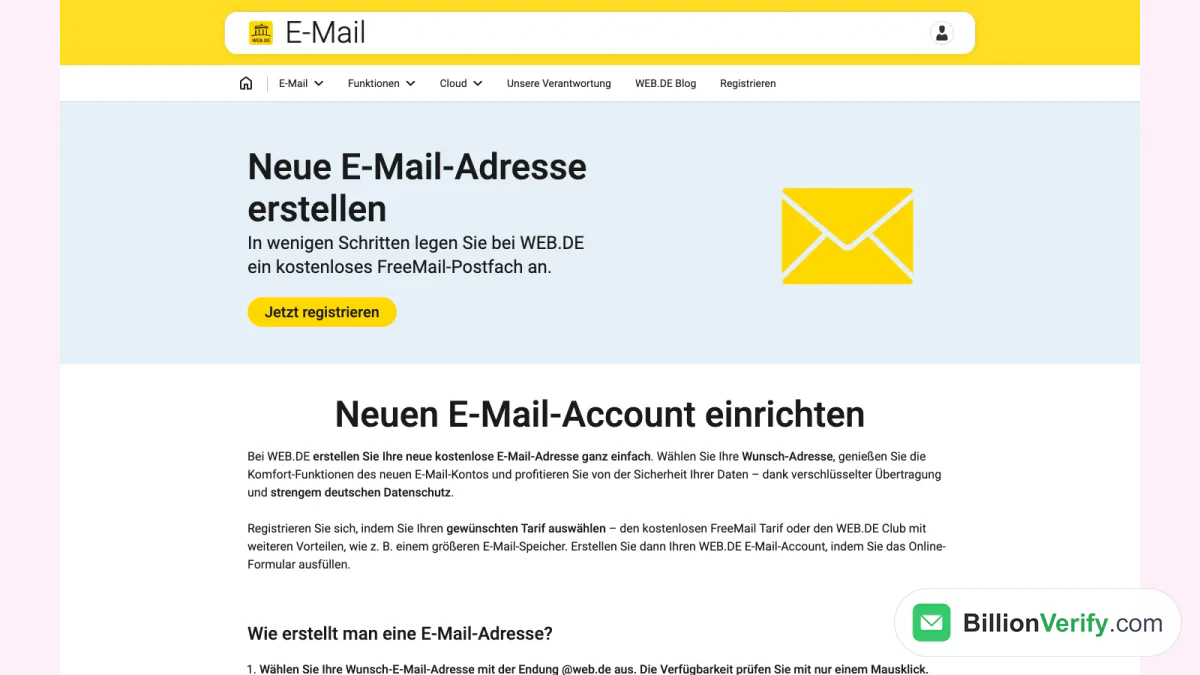
Screenshot: WEB.DE's page for a new address, opened in October 2026 without registering.
What the Numbers Do Not Show
Storage is the easiest figure to compare and the least important one for most readers. An inbox that receives newsletters and family photos rarely passes a gigabyte in a year. What the table cannot show is how much advertising arrives with a free address, and there the providers part ways. freenet labels its free plan as advertising-financed. GMX prints the same label on FreeMail. WEB.DE includes its own information mail as a fixed part of FreeMail. mail.de is the only German email provider here that runs an ad-free plan at all, and none of the other four matches it.
The second hidden figure is the address count, and the gap between providers is wider here. WEB.DE gives two on FreeMail and four on MailPlus. GMX allows a pair on its standard domains and sells alias addresses on top. mail.de gives a main address and an alias on FreeMail, and up to thirty aliases on PowerMail. Telekom lets customers add @magenta.de addresses to a @t-online.de login for free. Not every plan in this guide allows a second address, and anyone who needs one for shops and forums should read that column before the storage figures.
The third is the sending limit, where the fine print does most of the work. Telekom states a daily ceiling of 100 and 1,000 a month. mail.de states 25 a day on FreeMail Zero, 50 on FreeMail, 100 on PureMail, 500 on PlusMail, 2,500 on ProMail and 5,000 on PowerMail. None of this affects normal personal use, and providers set these limits themselves. It does matter if you plan to write to a list, which is where the terms usually become strict.
What a Paid Step Adds
Paying does not buy a different kind of email. It buys room, addresses, attachment size and support, and providers price the step by storage. On some plans the paid tier also removes advertising. That matters to German readers who archive mail for years, and a provider without ads is worth the fee to them. The step from free to the first paid plan is small at each provider in this list, which is why the paid option is worth a look before you accept a cramped inbox.
The ladder across these providers in Germany looks like this:
- mail.de PureMail at 0,99 €, and three more steps up to PowerMail at 6,49 € with unlimited storage.
- freenet proMail at 3,49 € without advertising, and premiumMail at 5,99 €.
- WEB.DE MailPlus at 3,99 €, and Club at 6,49 €.
- GMX ProMail at 3,99 € with larger attachments.
- Telekom Mail M, sold as an add-on to the free package.
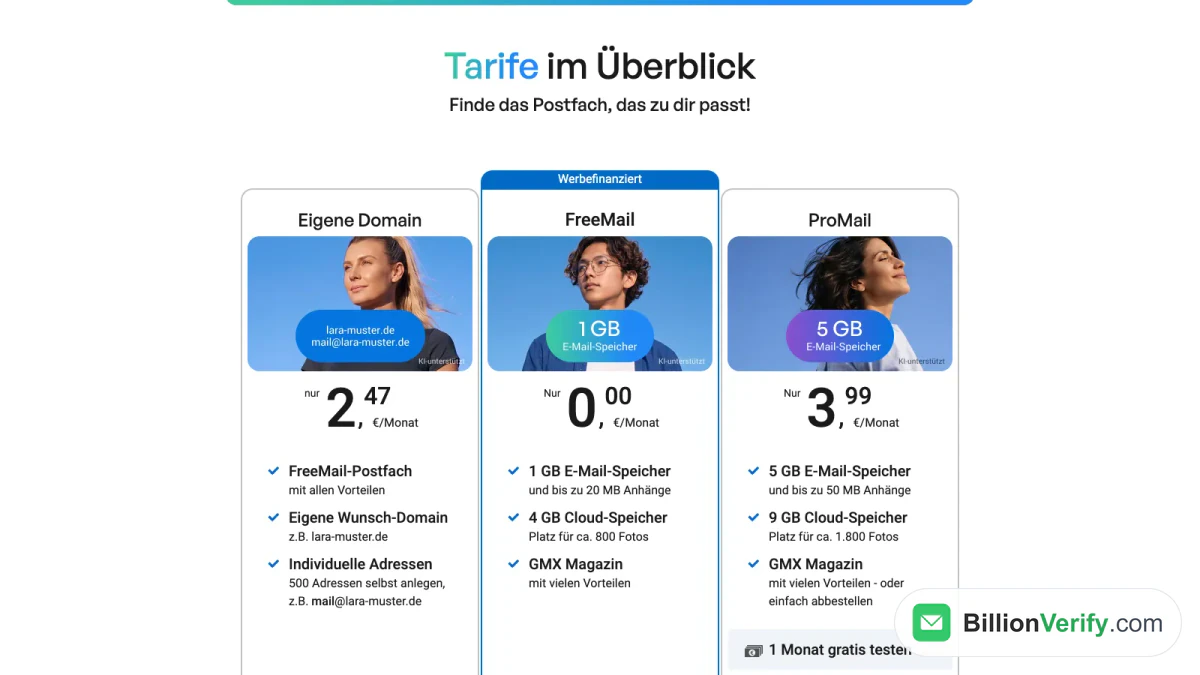
Screenshot: GMX's plan overview, with the advertising-financed FreeMail card in the middle.
Ad-Free Does Not Always Mean Paid
mail.de is the exception worth knowing. FreeMail Zero costs nothing, carries no advertising, and gives half the storage of FreeMail plus a daily ceiling of 25 messages and no support. The catch is size and support, not money. Someone who needs a quiet inbox for banking notifications can live with that for years, and an email provider with no advertising covers that need for most households.
At the other four providers in this guide, advertising disappears only when you pay. That is a fair trade for most readers, because the ads sit next to the inbox rather than inside the messages, and an email provider that charges nothing still has to pay for the servers somehow. It becomes unfair when an email provider puts its own mail into the email, which WEB.DE does on FreeMail and MailPlus, and which the company itself lists as part of the offer.
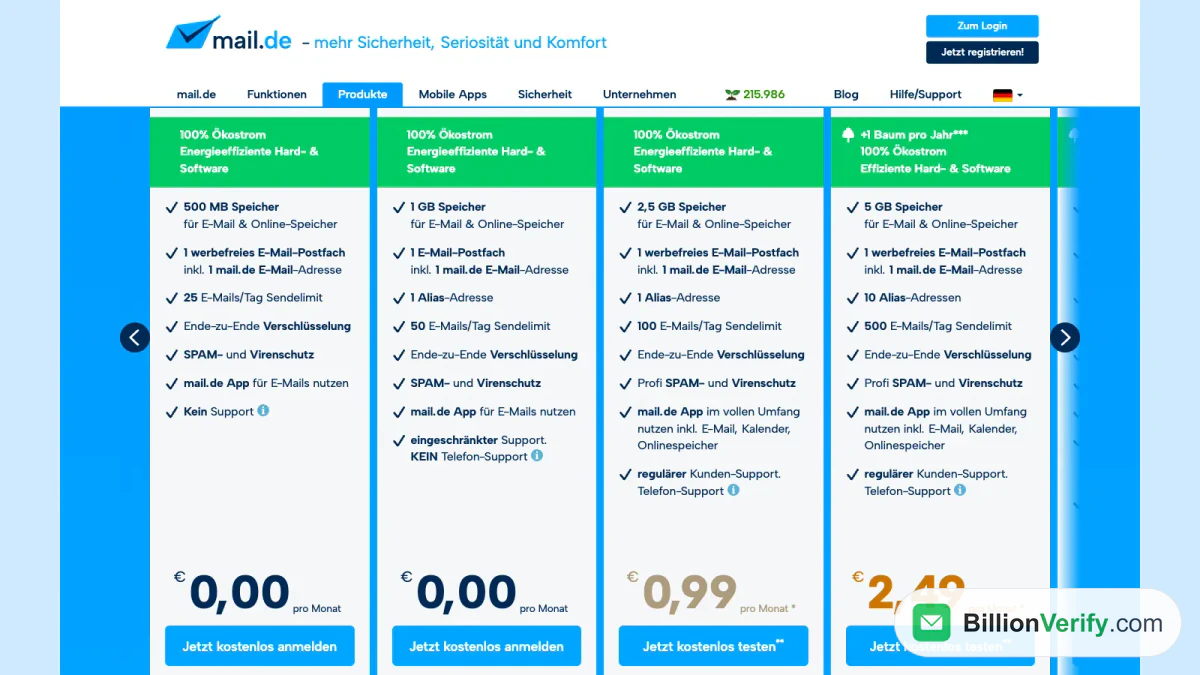
Screenshot: mail.de's product page, where the two free offers sit next to the paid ones.
German Email Providers That Work Differently
Five more providers in Germany come up when readers look for a place to start, and none of them fits the table above. Our mailbox.org walkthrough covers the sign-up and the plans. Two of these providers sell privacy, one sells a domain, and three come attached to a platform you probably already use.
| Provider | Model | What it means for you |
|---|---|---|
| mailbox.org | Paid, ad-free, German data centres | No free offer, storage per plan |
| Posteo | Paid by the month, ad-free | No advertising, no free offer |
| Tuta | Encrypted, free level plus paid plans | End-to-end encryption by default |
| Proton | Encrypted, tiered plans | Swiss company, paid tiers add storage |
| IONOS | Email on your own domain | You register a domain first |
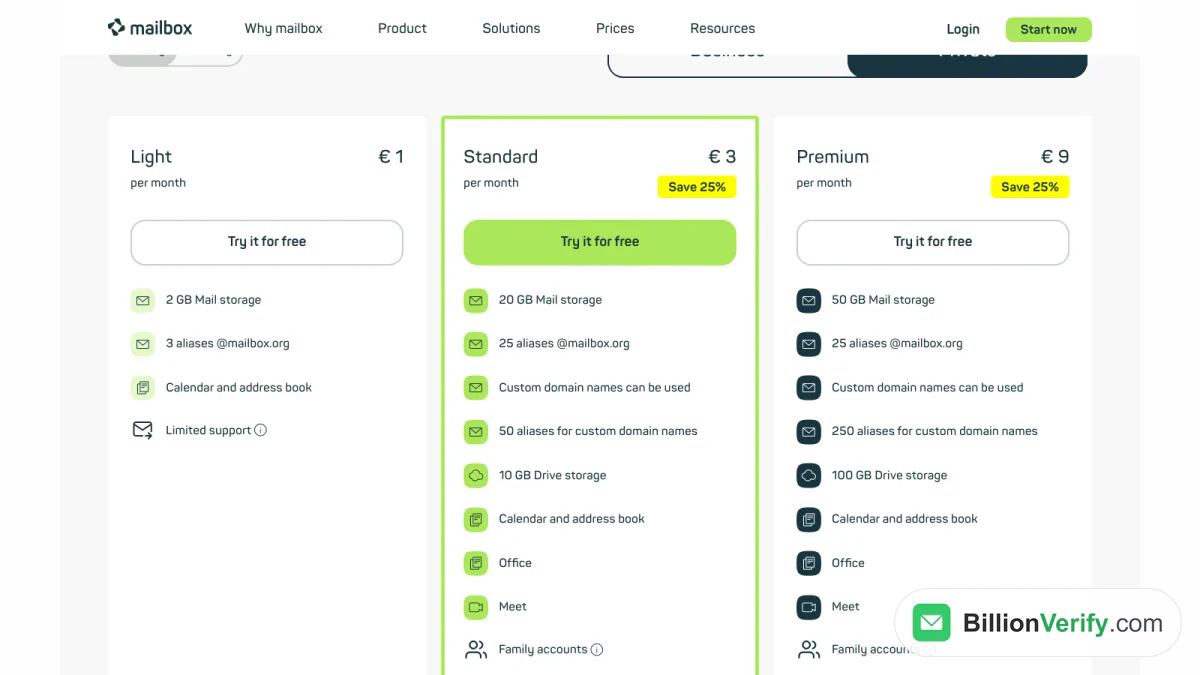
Screenshot: mailbox.org's price plans page, showing the storage steps and the yearly-billing discount.
Offers That Come With a Domain
IONOS sells email that sits on a domain you register, which is the option for a business, a club or anyone who wants an address that does not advertise its provider. The email and the domain are two products, and the domain renews every year whether you read the email or not. Our guide to the IONOS and 1&1 webmail login covers the sign-in side once the mailbox exists.
Offers That Come With a Platform
Gmail, Outlook and iCloud Mail are free and reliable, and each is tied to a platform account you may already hold. That is their advantage and their limit. You cannot hand the email to someone else, and the address usually carries your real name, because the account behind it does. For a first email they are fine. For a second address that you give to shops, the German email providers above are easier to separate from your identity, and the paid providers are the exception in this list.
Our guides to the Gmail login in Germany and to the Outlook and Hotmail login cover what those platforms ask of German users at signup.
Changing or Moving to a New Email
An address cannot be moved from one German provider to another. The domain belongs to the provider, so max.mustermann@web.de can never become max.mustermann@gmx.de. What you can move is the mail, and what you can keep is the old address for as long as you leave the old email open.
The workable order for a switch, as most providers describe it, looks like this:
- Create the new email and test it in both directions.
- Turn on forwarding from the old one to the new one.
- Tell the people who write to you most, and update your signature.
- Change the address at German banks, insurers and shops, and at any service that uses it to sign you in.
- Hold on to the old mailbox for at least three months, then close it.
The final step is the one most people skip. A login you forgot about will send its password reset to the old address months later. mail.de states that FreeMail keeps messages without a time limit, so an old mailbox still holds its mail; an account you never open is still not a backup.
Anyone who wants a new address rather than a second address at the same provider has to repeat the whole form, since no provider hands an address to another company. If you are changing the login on an existing email instead, the German providers in this list decide case by case whether that is possible. mail.de sells an individual login name that is separate from the address, which lets you change the part before the @ without losing the rest.
Austria and Switzerland
Nothing in the steps above is tied to a German passport, but the forms do ask for a postal address, so check that field before you start. Austrian and Swiss readers often hold an address from their internet or mobile provider, such as A1 or Magenta in Austria and Sunrise in Switzerland, and those arrive with a contract rather than from a signup form. If you already have one, the provider's own login page is the place to start, and an address from this guide works best as a second one.
Keeping the New Email Safe
A fresh email is a quiet target for a week or two after signup, then the first fake login page arrives. The pattern is always the same: a mail that looks like a provider notice, a link to a page that copies the real login form, and a request to confirm your password. No provider asks for a password by mail.
Four habits cover most of the risk:
- Turn on two-factor authentication where it is offered. WEB.DE lists it in its help centre, and mail.de supports an authenticator app or a U2F key.
- Use a password that exists nowhere else, stored in a manager.
- Keep the recovery address current, and make sure it is an inbox you can still open.
- Type the provider's address by hand instead of following a link in a mail.
The second point matters more in Germany than it does elsewhere, because a German inbox often doubles as the login for German shops, insurers and public services. A reused password turns a leaked shop database into a takeover.
Before You Send From the New Email
A fresh account needs a further check before you use it for anything that matters. Send a message to it from another address and confirm that it arrives. Then open it in the program or app you plan to use, not only in the browser, because an email that works on the web can still refuse a login over IMAP.
If you send to a list rather than to a single inbox, the same check applies to every entry you collected. Before a campaign, run the list through BillionVerify's email verifier. The verifier checks the syntax, looks up MX records, probes the mailbox and scores the risk, and it reports a catch-all domain as its own result instead of counting it as valid. A valid or invalid result costs 1 credit, an unknown one costs nothing, and a re-check within 24 hours is free. Each day you use the account gives you 20 credits, up to 600 a month, and they do not expire.
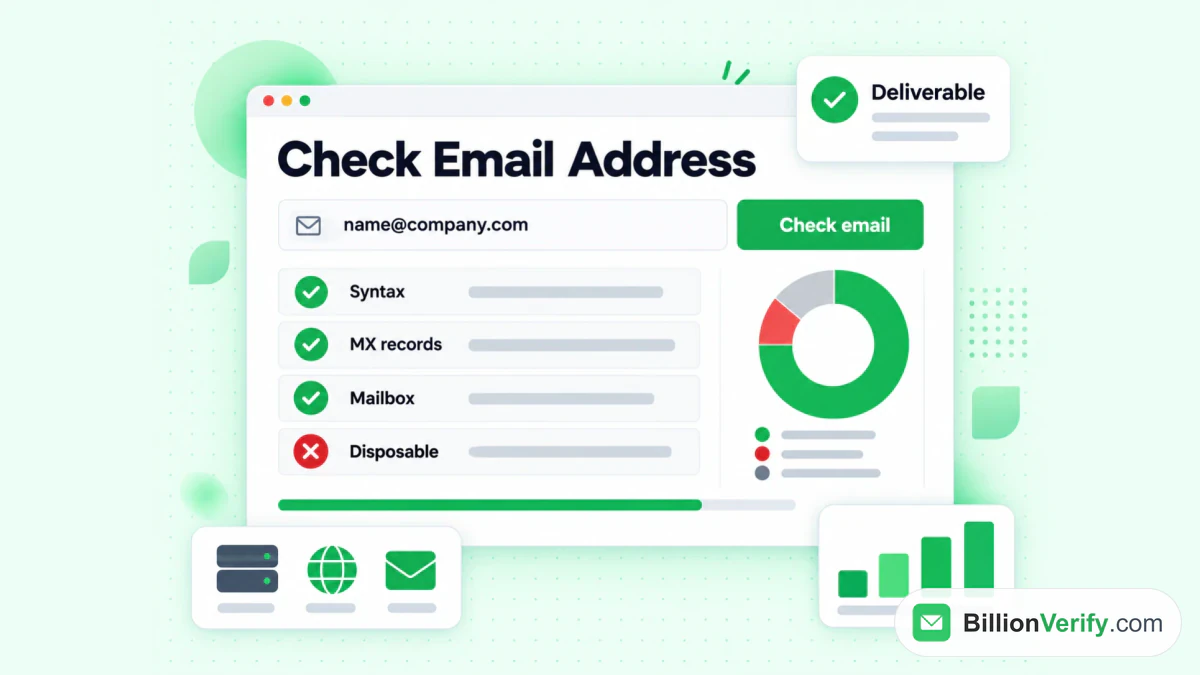
BillionVerify checks the format, the MX records, the mailbox and the risk behind an address.
Two neighbours of that check help at the same moment. If mail arrives from an address you do not recognise, a reverse email lookup shows what the address is attached to. If a signup asks for a phone number and you want to know whether it is real before you store it, the phone number validator answers that. And if you need an address that does not exist yet, the email finder takes a name and a company domain and returns one verified work email, charging 10 credits only on a hit; the Finder tools need a paid account.
FAQs
How much does an email in Germany cost?
A free address costs nothing at WEB.DE, GMX, mail.de, freenet and Telekom. Paid plans start at 0,99 € a month at mail.de and reach 6,49 € at WEB.DE Club and mail.de PowerMail. All prices include VAT.
Where can I create a free email address in Germany?
The shortest route is mail.de, which finishes registration without personal data and offers a free mailbox with no ads and 500 MB of room. WEB.DE gives more space but asks for your name, birth date and postal address. Both work from a browser without a contract.
Is it allowed to hold several emails?
Yes, and no central register stops you. You can open more than one address at each of the five, and every provider sets its own limit, so check the count before you start: WEB.DE gives two addresses on FreeMail, GMX two on its endings, mail.de a main address plus an alias. Opening an email at two different German email providers is the simplest way to keep private and public mail apart, and none of the five forbids it.
Can I keep my old address when I switch?
You keep it only as long as you keep the old email open, and an address at another company starts from an empty inbox. Set forwarding to the new one, leave the old one active for a few months, and close it once every login has been changed. An address on a provider's domain cannot be transferred to another company.
Why is my preferred login already taken?
Providers build suggestions from common first and last names, so short combinations are usually gone. Add a middle initial, a dot or a two-digit number, and check the result aloud. WEB.DE and GMX both show alternatives next to the field instead of refusing the form.
Do I need a German address to register?
The form asks for a postal address, not a passport, and WEB.DE collects one at signup. Where you live does not change the domain you get, which stays the provider's German one.
What happens to a free email I stop using?
A free mailbox that stays unused is a risk, because providers may block a free mailbox that looks abandoned. Sign in now and then, or set a calendar reminder, since an address that is closed cannot be reopened.
Which provider is the safest choice?
No provider here is unsafe, and the difference sits in how much data the form asks for and whether advertising pays for the email. mail.de asks for the least, mailbox.org and Posteo charge money instead of showing ads, and Tuta and Proton encrypt the mailbox itself. Match the choice to what you will use the address for, because providers hand over different things.
Watch: How to Export Past Email Finder Results From Find History
Watch: Free Reverse Email Lookup: What It Shows and What It Can't