


You've checked the campaign copy, cleaned the list, and confirmed the sender settings. Then messages start bouncing, and the error points back to the recipient domain. The first instinct is often to inspect SPF, DKIM, or the message itself, but the failure may be simpler: the domain's mail routing is missing, stale, or pointing to the wrong service.
An MX record check tool gives you the first infrastructure check. It shows whether a domain publishes mail-exchange records, whether those records identify legitimate mail servers, and whether their priority order makes sense. That's necessary groundwork, but it isn't the same as proving that a mailbox exists or that a server will accept a message.
Why MX Records Matter for Email Deliverability
A campaign can fail before spam filters ever evaluate the subject line. If the recipient domain has no usable mail-exchange path, the sending system can't determine where to deliver the message. If the domain still publishes an old provider's record after a migration, some senders may route mail to infrastructure that your team no longer controls.
An MX record check tool verifies that a domain has one or more valid MX records, that those records point to legitimate mail servers, and that their priority values are configured correctly. Lower priority numbers indicate higher delivery priority. Common operational guidance places TTL values in the 300 to 3600 second range, helping DNS changes propagate without leaving old routing information cached longer than necessary, as documented in this MX verification checklist.
The failure often starts with routing
Microsoft 365's DNS guidance identifies the MX record as the route for incoming mail to Exchange Online and recommends removing old MX records once delivery is working. Zoho gives similar advice, warning that lower-priority legacy records can divert delivery away from the intended service. A domain can therefore appear to have mail infrastructure while still routing some messages to the wrong destination.
That's why MX validation belongs before campaign launch, list expansion, or a provider migration. It answers the foundational question: does this domain publish a plausible path for inbound email? For a broader view of sender reputation and inbox placement, Networking2000's advice on inbox placement is a useful companion resource.
A domain-level check doesn't replace mailbox verification. It does, however, stop teams from treating a routing failure as a copy problem, and it gives deliverability investigations a reliable first checkpoint. Teams that want to connect infrastructure checks with broader campaign diagnostics can also use this email deliverability testing guide.
How MX Lookups Work and What Results Mean
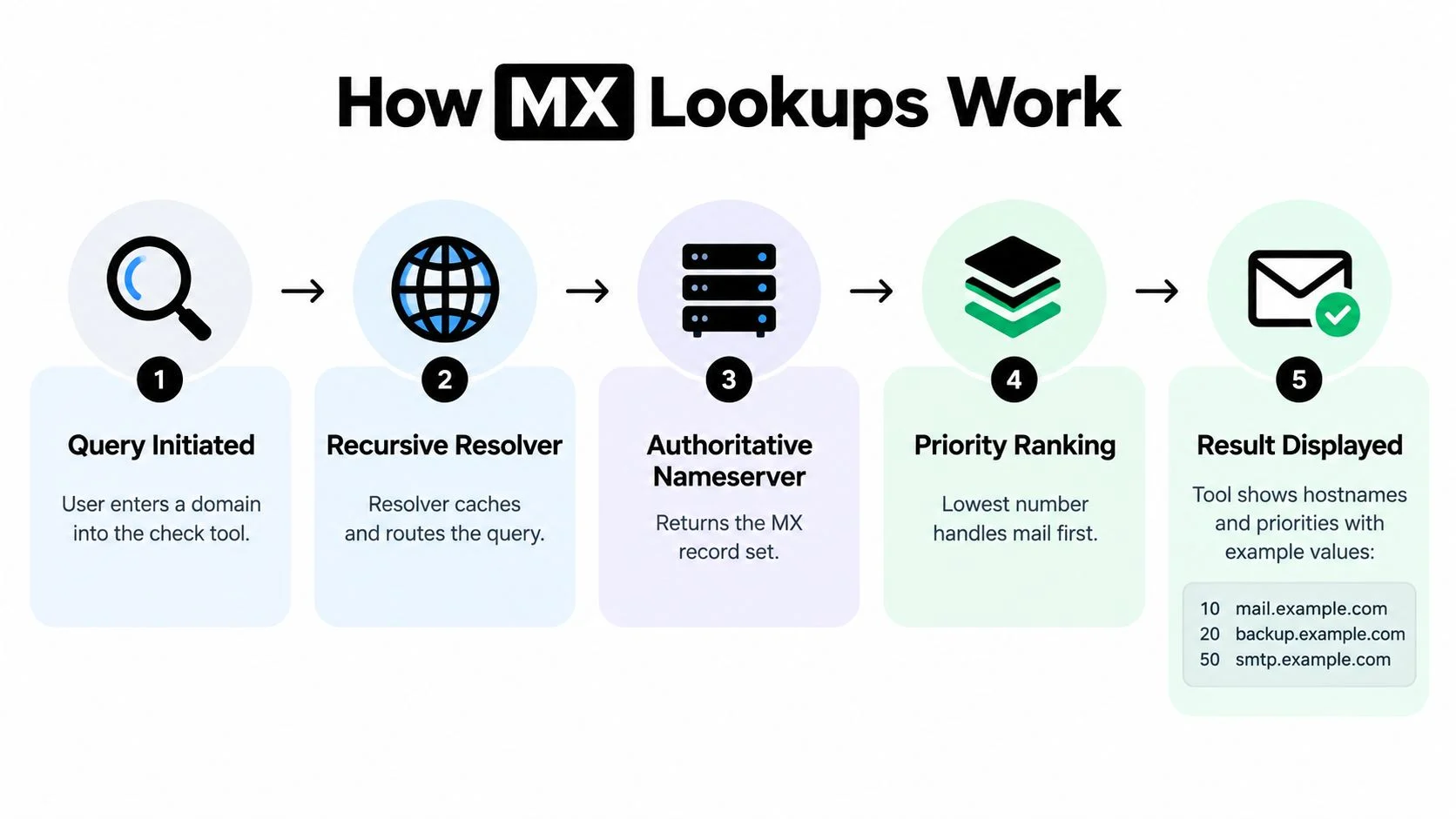
An MX lookup asks DNS which mail servers accept incoming email for a domain. The result normally includes a hostname, a priority value, and often a TTL. The hostname identifies the mail system, while the priority determines which destination a sending server should try first.
Lower numbers have higher priority. If a domain publishes records with different values, senders generally attempt the lowest-numbered destination before moving to the next available one. A result such as 10 mail.example.com therefore communicates both the destination and its position in the routing order.
Read the answer in the right order
Start with the record set, not the visual pass or fail indicator.
- Confirm publication. The domain should return one or more MX records when inbound mail is expected.
- Inspect hostnames. Each destination should identify a legitimate mail server rather than an obsolete provider or an obviously malformed name.
- Compare priorities. Lower values represent preferred destinations. Unexpected ordering can send traffic to the wrong service.
- Review TTL. A TTL shows how long resolvers may cache the answer. Microsoft 365's published guidance specifies an MX TTL of 3600 seconds, as described in its DNS recommendations summarized by DigiCert's email DNS guidance.
- Check the live response. A recently changed record may not appear consistently through every cached resolver.
The most useful tools query the domain's authoritative DNS directly. That approach exposes the live MX set and priority order that mail senders will use. When the authoritative response changes, the updated routing can appear immediately, making this method valuable for spotting a recent migration error or a newly introduced conflict, as reflected in MXToolbox's testing resource.
Command-line utilities remain useful reference points. On Linux or macOS, administrators commonly use dig MX domain.com; on Windows, nslookup -type=MX domain.com provides the same basic DNS view. A web interface is faster for routine checks, while raw queries help engineers compare responses during a migration. For a related explanation of how checks DNS, use a tool that makes the lookup method clear rather than hiding every detail behind a single green result.
MX Records in the Broader Email Authentication Stack
MX records answer a routing question, not an authentication question. They tell receiving systems where inbound mail for a domain should go, while SPF identifies permitted sending infrastructure, DKIM adds a cryptographic signature, and DMARC defines how receiving systems should handle authentication failures and alignment.
That distinction matters during troubleshooting. A domain can publish a sensible MX record and still have problems caused by an incomplete SPF policy, a missing DKIM configuration, or a DMARC policy that doesn't align with the visible From domain. An MX result is therefore a foundation, not a complete reputation assessment.
Migration errors rarely stay isolated
Provider changes create the clearest example. A team updates the preferred MX record but leaves an older provider in the zone. The resulting priorities may direct some inbound traffic to the new service and other traffic to infrastructure that should no longer receive mail. Zoho advises deleting records from the previous provider to avoid this type of conflict, while Microsoft 365 guidance recommends setting the new MX priority lower than other records and using a 3600-second TTL, as covered in the earlier email DNS reference.
The same review should include the rest of the DNS authentication stack. MailGenius provides a practical resource for teams that need to check SPF and DKIM records alongside routing. Teams should also check DMARC records, especially when a migration changes the sending service, return-path behavior, or domain alignment.
Operational rule: Treat MX, SPF, DKIM, and DMARC as connected controls, but don't ask one record type to prove what another record type governs.
This systems view prevents a common diagnostic mistake. A successful MX lookup means the domain advertises mail infrastructure. It doesn't establish that outbound messages authenticate correctly, that the receiving host is reachable, or that a particular mailbox accepts mail.
The Limits of DNS-Based MX Validation
A valid MX result can create false confidence. It proves that a domain publishes mail-exchange infrastructure, but it doesn't prove that a specific mailbox exists or that the destination server will accept a message.

Publication is not reachability
A basic lookup may show a hostname and priority while missing the operational problems that determine whether delivery can proceed. The host might be unreachable, a connection could fail, or the server might refuse relay attempts. Practical diagnostics therefore add connection tests, reverse-DNS checks, and response-time measurements to identify blocked ports, unavailable hosts, and relay issues, as explained in this SMTP configuration guide.
Free lookup services can also rely on public resolvers or cached and sanitized responses. Those answers may omit a destination, fail to validate priority behavior, or miss a mail server that resolves but doesn't respond. The interface may report a healthy DNS publication while the live delivery path remains unusable.
That difference is central to campaign operations:
- DNS publication shows what the domain advertises.
- Hostname resolution shows whether the advertised destination can be found.
- Server responsiveness shows whether the destination can be contacted.
- SMTP verification tests whether the receiving system will accept the mailbox.
A green DNS result only addresses the first layer, and sometimes part of the second. It shouldn't be used as a substitute for recipient-level verification.
A short visual explanation can help teams distinguish the record from the service behind it:
The practical consequence is straightforward. Use an MX record check tool to identify domains with no apparent delivery path or with suspicious routing. Use SMTP-level diagnostics when the decision concerns whether an address is safe to mail.
From MX Checks to SMTP Verification
SMTP verification adds a live acceptance test to the DNS picture. Instead of stopping at the domain's mail server, the verifier connects to that server and evaluates whether it appears willing to accept the specified mailbox.
That additional layer can identify invalid addresses, catch-all domains, disposable domains, and role accounts. Each category affects list quality differently. An invalid address is a direct bounce risk, a disposable address may have short-lived value, and a role account can represent a shared function rather than an individual recipient.

Catch-all behavior changes the interpretation
Catch-all domains deserve special handling. They accept mail for any local part, so the server may appear to accept an address that doesn't correspond to a real mailbox. In that situation, a valid MX record and a positive SMTP response still don't provide the same confidence as confirmation from a non-catch-all domain.
A useful verification result separates these conditions instead of flattening them into “valid” or “invalid.” Modern email verification APIs commonly return structured JSON with statuses such as valid, invalid, catch_all, unknown, and do_not_mail, together with SMTP confirmation fields and sendability guidance, as shown in the Mailvalid API documentation.
That structure gives marketers a practical decision layer:
- Valid: retain for normal sending when the rest of the campaign controls are sound.
- Invalid: suppress rather than repeatedly retrying.
- Catch-all: segment for additional caution because mailbox existence isn't confirmed.
- Unknown: hold or retry later when the response doesn't support a confident decision.
- Do not mail: exclude from campaign sends.
BillionVerify is a professional email verification service built to address the cost of bad email data. Its relevance here is the combination of domain-level inspection with recipient-level checks, rather than treating an MX record as the final answer.
Using BillionVerify for Complete MX and SMTP Diagnostics
A standalone MX lookup is useful when the question is narrow: does this domain publish mail-exchange records, and are the destinations ordered plausibly? A verification platform serves a different purpose. It connects domain findings with mailbox-level results so a marketing or operations team can decide what to do with each address.
The useful output is structured rather than purely visual. JSON responses can include explicit status values, MX records, catch-all results, SMTP confirmation fields, and sendability guidance. That format works for both a person reviewing a cleaned list and an application making a decision during signup or import.
Choose the depth of testing by the decision
Use a basic MX check when you're:
- validating a new domain's inbound routing,
- checking for stale records after a provider migration,
- investigating why a domain can't receive mail,
- confirming that published priorities match the intended service.
Use combined MX and SMTP verification when you're:
- cleaning a campaign list before sending,
- separating invalid, catch-all, disposable, or role addresses,
- validating an address during account creation,
- feeding results into a CRM or outbound workflow.
The trade-off is diagnostic depth. DNS checks are fast and domain-focused, but they stop before mailbox acceptance. SMTP verification takes the analysis closer to the actual recipient and can produce uncertain results when servers limit probing or decline to reveal mailbox status. A structured unknown result is more useful than an overconfident pass because it gives the team a deliberate retry or review path.
For sales and marketing teams, the workflow is simple: inspect the domain, interpret the SMTP result, then segment the record according to its status. For product teams, the same logic can run at registration, preventing obviously bad addresses from entering the database. The value comes from turning infrastructure evidence into an explicit data action.
Building a Repeatable Email Verification Workflow
A dependable workflow starts with the cheapest useful question and adds depth only when the decision requires it. That keeps infrastructure troubleshooting separate from list hygiene while still connecting both to sender reputation.
Start with the domain
Run an MX check before diagnosing a recipient list. Confirm that the domain publishes mail-exchange records, inspect the destination hostnames, and review priority ordering. If a migration recently occurred, look specifically for legacy records that could still attract delivery.
Then review the supporting DNS controls. MX establishes the inbound route, while SPF, DKIM, and DMARC help receiving systems evaluate authenticated sending. A routing result can be healthy while one of those controls remains incomplete, so campaign readiness requires the combined view.
Move from domains to addresses
Once the domain has a plausible route, run SMTP-level verification on the actual addresses. Separate clear outcomes from uncertain ones rather than forcing every response into a binary decision.
A practical segmentation model looks like this:
- Send: addresses with a clear positive result and no disqualifying signal.
- Suppress: invalid and do-not-mail results.
- Review: catch-all, role, or disposable addresses that need a deliberate business decision.
- Retry: unknown results that may reflect temporary server behavior or inconclusive responses.
This approach protects the list without pretending that every receiving server exposes the same information. Catch-all detection remains particularly important because acceptance at the domain level doesn't confirm the mailbox itself.
Apply the checks at the right moments
Marketing teams should verify lists before a campaign and repeat the process when their data source changes. Sales teams should screen imported or purchased contacts before adding them to sequences. Product teams should use real-time validation at signup when fake or mistyped addresses would create downstream support and activation problems.
An Email Validation API fits the last use case by returning machine-readable results that an application can interpret immediately. For batch operations, the same result categories support export filters and suppression workflows.
Decision rule: If you're troubleshooting domain routing, start with MX. If you're deciding whether to send to a person, add SMTP verification.
Teams should also document the reason for each status. A suppressed address caused by an invalid mailbox is different from a catch-all address held for review, and both differ from an unknown response awaiting another attempt. That record makes future audits faster and helps campaign owners understand why an address wasn't mailed.
An MX record check tool is therefore necessary but insufficient. It confirms the public routing layer, while SMTP diagnostics test the operational layer. Used together with SPF, DKIM, DMARC, list segmentation, and sensible retry handling, the workflow gives teams a clearer basis for protecting bounce rates and sender reputation.
BillionVerify combines MX inspection with SMTP-level email verification, returning structured results that help teams distinguish valid, invalid, catch-all, unknown, and do-not-mail addresses. Visit BillionVerify to evaluate how its verification workflow can fit your campaign, CRM, signup, or outbound email process.