



The Sunrise email login sits at mip.sunrise.ch. You type your full Sunrise name and your password, press "Login", and the webmail opens. Customers who still use a UPC address log in on a different page at upcmail.hispeed.ch, which Sunrise links to from the same screen.
This guide lists each Swiss login we could open, how registration works, the reset steps, the connection values and the limits Sunrise publishes. Every fact about the operator comes from Sunrise's own pages, read in October 2026. We did not register or sign in, and we are not affiliated with Sunrise. BillionVerify is an email verification service. If the term is new, what webmail is is explained in our glossary.
Key facts (checked October 2026):
- Sunrise describes Sunrise mail as a free service for its customers, and the login is hosted on mip.sunrise.ch.
- Sunrise's mail article says a Sunrise phone contract is required, with up to five accounts per landline and one per mobile.
- The same text lists 5 GB of storage, 50 MB per message including attachments and an hourly limit of 100 sends.
- A link in the login box leads UPC customers on to upcmail.hispeed.ch.
- Sunrise says a mailbox name is fixed after registration; to get another, you delete the old mailbox and start over.
- BillionVerify's account gives 20 free credits on each day you use it, with no card needed, for checking addresses before a send.
How the Sunrise Email Login Works
Sunrise's login box is short. A red "Sunrise mail" heading sits on top, and the welcome line calls the service "powerful and free". The box titled "Login Sunrise mail" asks for the account name plus a password. A tick box reads "Save login on this computer", and a red button says "Login". On a shared or office computer, leave the tick box empty.
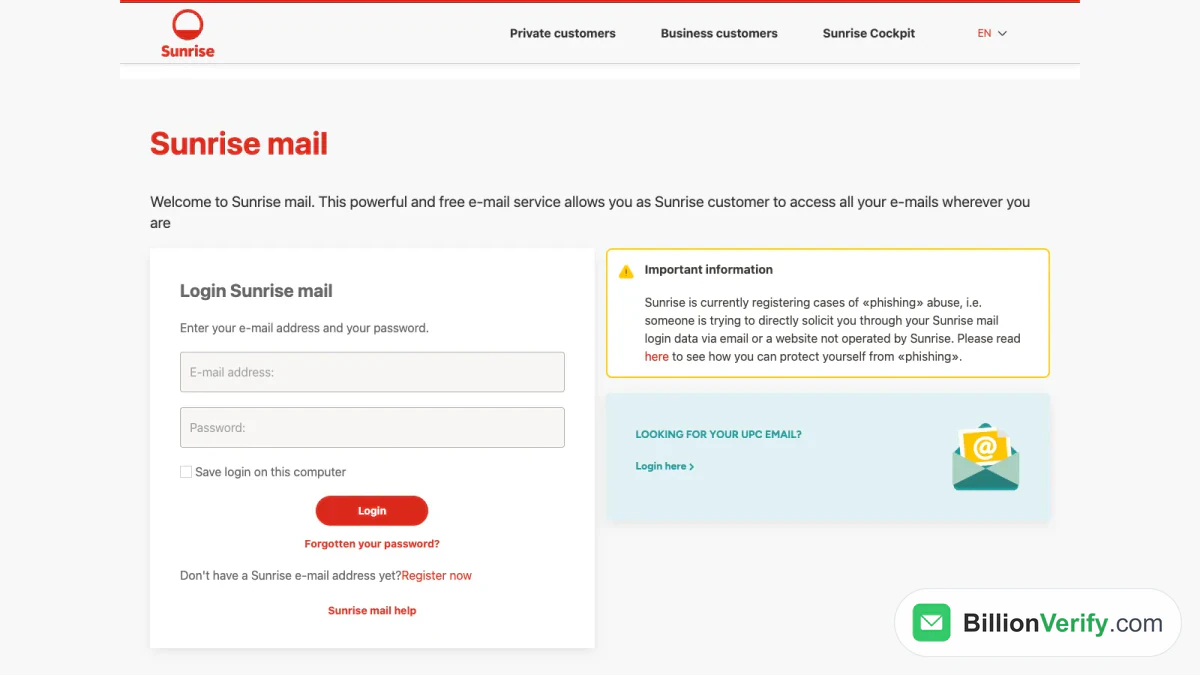
Screenshot: the login box, opened as a visitor.
Under the button sit "Forgotten your password?" and a question for newcomers with a "Register now" link. The page comes in four languages. In German, the labels read "E-Mail-Adresse", "Passwort", "Passwort vergessen?" and "Jetzt registrieren".
What to Type in the First Box
Type the whole mailbox, ending included. Sunrise's recovery step says so in plain words, because it asks for it "incl. @sunrise.ch". Sunrise's article also mentions alias names with endings such as @freesurf.ch, which you can pick as a sender once you are signed in.
The Warning Next to the Form
A yellow box beside the fields says Sunrise is registering cases of phishing. Someone tries to get your login data through a message or a website that Sunrise does not run. Sunrise also advises changing your credentials regularly. Both notes link to further advice, which we cover in the phishing section below.
UPC Mail, Hispeed and Other Addresses
Sunrise runs two separate mail entrances, and the right entrance depends on the address you own. A light blue box on the Sunrise side asks "Looking for your UPC email?" and offers a "Login here" link. In German it reads "Du suchst deine UPC E-Mail?" with the link "Zum Login". The link leads to upcmail.hispeed.ch, so the old hispeed name still shows in the browser bar.
| What you use | Where Sunrise sends you | Source |
|---|---|---|
| Sunrise address | mip.sunrise.ch login | Sunrise's login |
| UPC address | upcmail.hispeed.ch/appsuite | Link on the Sunrise screen |
| Outlook, Thunderbird, Apple Mail | imap.sunrise.ch and the other servers below | Sunrise's support text |
| Quickline address | webmail.quickline.ch | Quickline's own screen |
The UPC Form
The UPC screen looks nothing like the Sunrise login. It has a blue background, the title "UPC Mail" and the line "Provide your mail account details". Two boxes ask for "Email address" and "Password", and a blue "Sign in" button sits under them. A "Forgot your password?" link is on the right. The "Stay signed in" box was ticked when we opened it, so untick it on a shared computer.
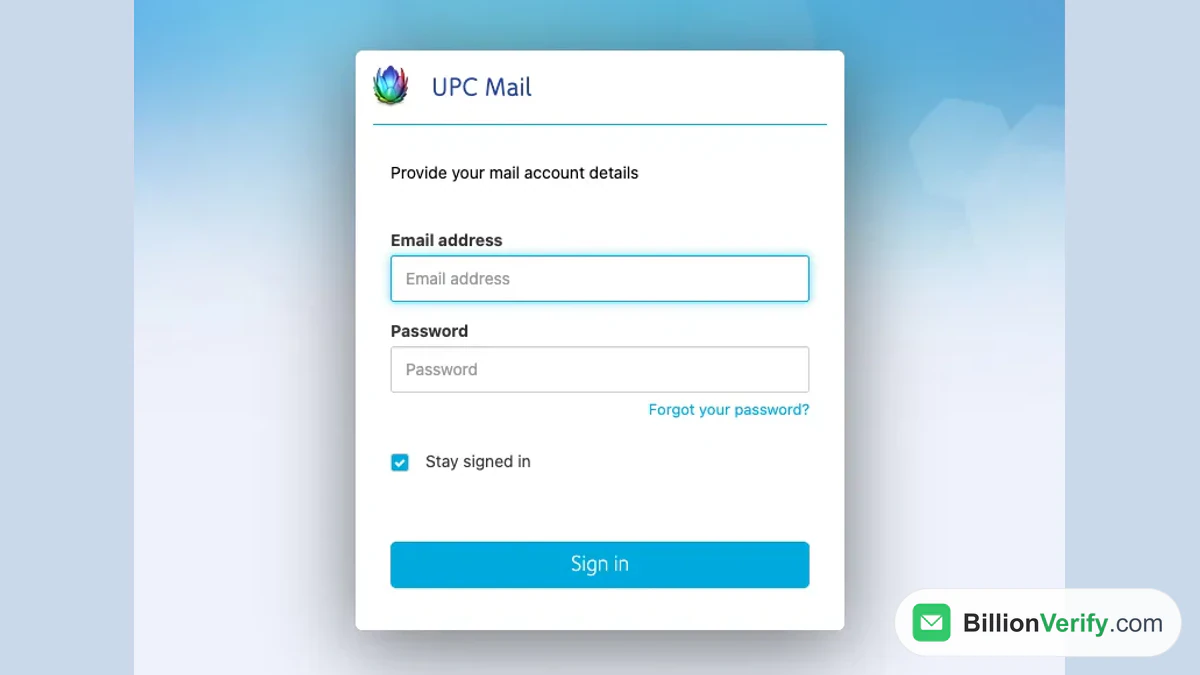
Screenshot: UPC Mail's own login, opened without credentials.
Hispeed and Cablecom Names
Sunrise does not say which endings the UPC screen accepts. We found no official text on the history of the hispeed or cablecom names, and we will not guess. If your address carries one of those names, try the UPC screen first, because that is where Sunrise points UPC customers. If it refuses the entry, ask the Sunrise Community, which its support pages link to.
Quickline Is Separate
Quickline also offers a webmail, at webmail.quickline.ch. The title reads "Quickline Webmail Login", and it works with a username and a password. It carries the Quickline name, so Sunrise credentials do not belong there.
Register for Sunrise Mail
Registration is for Sunrise customers. The sign-up opens with the sentence "As a Sunrise customer you benefit from many advantages" and asks for a Sunrise fixed network or mobile phone number. The support text confirms the rule. One landline number can hold five accounts, while a mobile number holds one. A signed-in user can also link another Sunrise number to the same account under "Settings" and then "Assign another phone number to my Sunrise mail account".
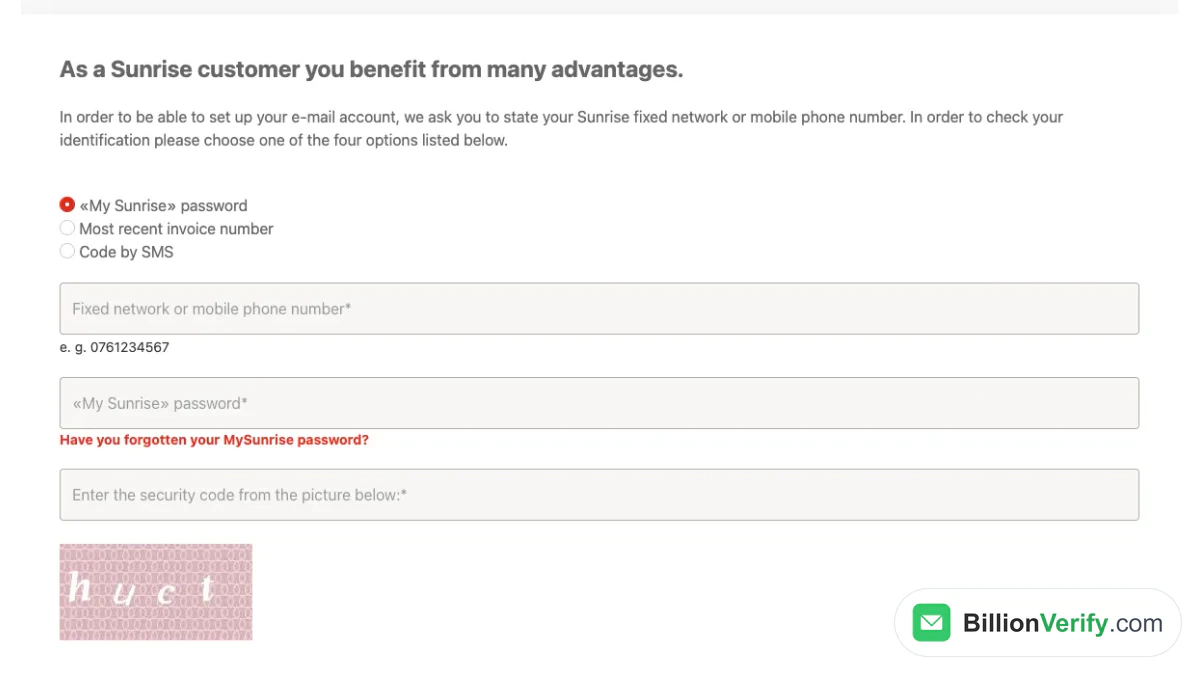
Screenshot: the registration step, left empty.
The sign-up checks who you are in a few steps:
- Open "Register now" under the login button.
- Choose one way to identify yourself: the "My Sunrise" password, the most recent invoice number or a code by SMS.
- Enter the number of your Sunrise contract.
- Fill in the matching proof and the security code from the picture, then press "Continue".
The mailbox cannot be renamed later, and the only fix for a typo is a fresh start. Pick the name with care before you press the last button.
Reset or Change the Sunrise Mail Password
There are two cases, and they use different screens. If you forgot the password, the recovery step asks for your address with the @sunrise.ch ending and a security code, then you press "Send". That article also offers a "Request password" button for the same job. If you remember it and only want a fresh one, you change it from inside the account.
- Forgotten: use the recovery link under the login button, enter the address and the code, then press "Send".
- Known: sign in, open "Settings" and choose "Change password".
- Recovery contact: under "Settings", pick "Change alternative e-mail address", so that a reset has somewhere to go.
Sunrise adds a warning that is worth repeating. Sunrise will never ask you to reveal your login details by email or SMS. If a message asks for them, delete it without replying, because Sunrise calls this fraud aimed at your account.
Server Settings for Outlook, Apple Mail and Phones
Sunrise recommends the more modern IMAP protocol over POP. Its mail article lists one server per protocol, always with an encrypted connection. Desktop programs need these values.
| Protocol | Server | Port | Security |
|---|---|---|---|
| IMAP | imap.sunrise.ch | 993 | SSL |
| POP | pop.sunrise.ch | 995 | SSL |
| SMTP (sending) | smtp2.sunrise.ch | 465 | SSL |
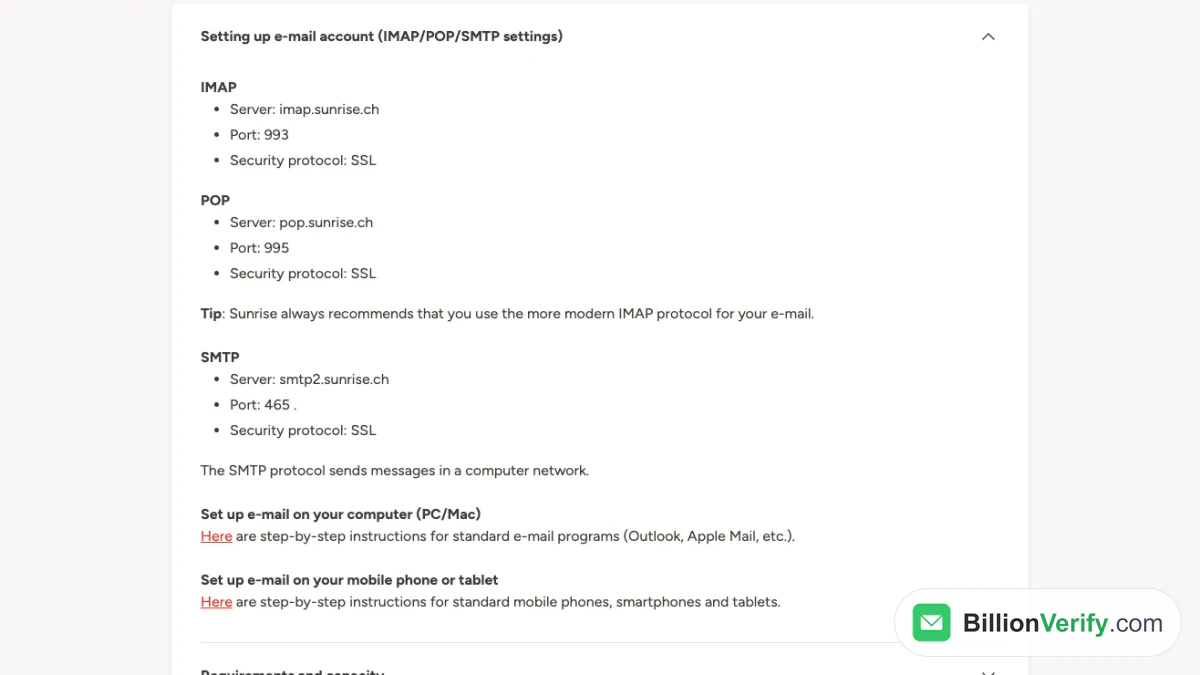
Screenshot: the support article with its connection values.
The text does not name a username format, so start with the same entry you type at login. It links to step-by-step instructions for programs on a computer and for phones and tablets. Only port 465 is listed for sending.
Storage, Sending Limits and Spam
Sunrise gives each mailbox 5 GB and lets a single message, with attachments, reach 50 MB. The limits on sending matter more for anyone who mails many people. An account older than seven days may send up to 2,000 messages in 24 hours, a newer one 500, and each is held to 100 an hour. When a limit is hit, sending stops while incoming mail keeps arriving.
The spam folder works by hand and by rule. You mark a message with "More" and then "Mark as Spam", and later mail from that sender goes to the folder. Sunrise empties it for good after 90 days. If a good sender lands there by mistake, open the "Spam" folder, select the message and press "Not spam".
Settings You Can Change
The article lists menu paths for the common tasks. All of them start after you sign in.
- Forwarding: "Inbox", "Settings", "Manage inbox", then enter the target under "Forwarding".
- Mail from other accounts such as Gmail or GMX: "Inbox", "Settings", "Accounts".
- Absence notice: "Inbox", "Settings", then fill in "Absence notification" and save.
- Contacts: "Inbox", "Contacts" for groups, plus "Import" for files.
- Delete an alias: "Settings", then "Delete mail alias".
- Close the mailbox for good: "Settings" and "Delete account".
Report Phishing Aimed at Sunrise Mail
Sunrise explains phishing as a request for passwords or card data from a fake site or message. The fakes copy well-known companies, and, in Sunrise's words, the likeness to the real site is surprisingly high. Check the browser bar before you type anything: the real login lives on mip.sunrise.ch, and the UPC login lives on upcmail.hispeed.ch.
Sunrise names three reporting routes on its security overview. Forward a phishing email to Phishing@sunrise.net, which a machine processes automatically. Pass a phishing text message on to 7726. Report a fake website through the web form there. The site antiphishing.ch offers a second route, with reports@antiphishing.ch for forwarded emails and a form for fake sites.
Emailing Sunrise Mail Users? Verify Before You Send
Some readers of this guide do not own a Sunrise inbox. They write to people who do. Lists age, and a closed inbox can still sit in your database for years.
The published limits show why a clean list matters if you mail from a Sunrise account yourself. An hourly cap of 100 is small. Every bounce is a further attempt that counts against it, so there is little room for waste.
BillionVerify's email verifier checks addresses ahead of a send, with syntax, DNS, MX and SMTP checks. Valid and invalid results cost 1 credit each, and unknown results are free. You get a free re-check within 24 hours, and catch-all addresses get their own label instead of being counted as valid. The free allowance is 20 credits per day of use, up to 600 a month, and credits never expire. Our servers are in France (EU), and a DPA can be signed. We make no claim about how Sunrise's servers answer a check.
Other tools help earlier in the process. If you need a work address for a Swiss contact and have only a name and a company domain, Email Finder returns a verified one, and you pay 10 credits only when it finds a match. It is available on paid accounts only. For a message from an unknown sender, our reverse email lookup is a starting point. A signup form that collects Swiss phone numbers can use our phone number validator to see whether a number fits its country. Related guides cover Austrian operators, in our Magenta and Chello webmail guide and the A1 webmail login.
FAQs
Where do I sign in to Sunrise mail?
The Sunrise email login is a web service at mip.sunrise.ch, offered in German, French, Italian and English. Fill in the whole name and the password, then press "Login".
Is Sunrise mail free?
Sunrise's text describes it as free for its customers. An account needs a Sunrise landline or mobile number, so it is not meant for people outside the network.
Where do I sign in to UPC mail?
Use the blue box next to the Sunrise login, or open upcmail.hispeed.ch directly. That screen is titled "UPC Mail" and is a different page from the Sunrise login.
Can I rename my Sunrise mailbox?
No. Sunrise says the name stays unchanged once it is registered. You can delete the account and register again, which means moving mail and contacts by hand.
How many messages can a Sunrise mailbox send?
No mailbox may send more than 100 within one hour. A newly opened inbox, under seven days old, may send 500 in 24 hours, and an older one 2,000.
Does Sunrise mail work in Outlook?
Yes. Sunrise publishes IMAP, POP and SMTP values for desktop programs, and it prefers IMAP. The table above lists them.
How do I report a phishing email that mentions Sunrise?
Forward it to Phishing@sunrise.net and do not click anything inside it. For a text message, send it to 7726.
Watch: How to Export Past Email Finder Results From Find History
Watch: How to Validate a Phone Number: Free Phone Number Validator