




Cold email outreach is a first business email sent to someone who has no relationship with you yet, written to start a conversation rather than to close a sale. B2B cold email outreach usually means one person writing to a named buyer at another company, then sending a few short reminders. Done well, it reads like a note from a peer. Done badly, it is spam that lands in the junk folder and drags your domain down with it. The difference comes from three things: who you write to, the rules you follow, and what you say.
This guide covers the whole job, from building a defensible list to writing the opener, spacing the reminders and reading the results. The legal and technical rules are quoted from the regulators and providers themselves, as read on their official pages in November 2026. We have no connection with the FTC, the ICO, the CRTC, Google, Yahoo, Microsoft or Apple. This is not legal advice, and providers update their requirements, so check the live page before you rely on a rule. BillionVerify is an email verification service, and the list section explains where verification fits before a campaign starts.
Key facts (checked November 2026):
- The FTC's CAN-SPAM compliance guide states that the law makes no exception for business-to-business email and that each separate violating email can cost up to $53,088.
- The same FTC guide requires a sender to honor an opt-out request within 10 business days and to keep the opt-out mechanism working for at least 30 days after sending.
- Google's email sender guidelines tell every sender to keep the spam rate in Postmaster Tools below 0.3%, and senders of more than 5,000 messages a day to Gmail must add DMARC and one-click unsubscribe.
- Yahoo's sender best practices require bulk senders to honor unsubscribes within 2 days and to hold spam complaints below 0.3%.
- The UK Information Commissioner's Office says on its electronic mail marketing page that PECR lets you email any corporate body, while sole traders and some partnerships are treated as individuals who must have consented.
What Cold Email Outreach Is, and What It Is Not
A cold email is unsolicited, but unsolicited is not the same as spam. Spam is mail people did not want, sent in bulk without regard to who receives it. A legitimate B2B cold email goes to a specific person whose job makes the email relevant, identifies the sender honestly and offers a simple way to say no. Most of the work in a good program happens before anyone writes a word: choosing the companies, finding the right person and checking that the mailbox is real.
It also differs from a newsletter. Subscribers asked for a newsletter, so it can go to thousands of people at once from a marketing platform. Cold outreach has no such permission, so it works in small, targeted batches sent from a normal mailbox, and each email should make sense to the person reading it. When a program starts to look like a newsletter sent to strangers, Gmail and Outlook treat it that way.
The providers are open about this tension. Among its sending practices to avoid, Google lists buying addresses from other companies and sending to people who did not sign up, because those recipients might mark the mail as spam. Yahoo's page notes that sending unsolicited commercial email can hurt your reputation. Neither statement makes cold outreach illegal, but both explain why every complaint costs more for a cold sender than for a newsletter.
Is Cold Email Legal?
In most markets a B2B cold email is lawful when it follows the local rules, but those rules differ sharply from country to country. The United States regulates how commercial email is sent. The UK and EU regulate whose data you use and whether the recipient is a company or a person. Canada starts from consent. Rules follow the recipient as well as the sender, so a list that mixes regions needs each part checked against its own law. Our separate guides to the CAN-SPAM Act, GDPR for email marketing and CASL compliance go deeper on each law.
United States: CAN-SPAM
The CAN-SPAM Act covers every commercial message, which the law defines as email whose primary purpose is to advertise or promote a product or service. The FTC is explicit that B2B mail gets no exception. The Act does not ask for permission before the first email. Instead it sets conditions on each send and gives recipients the right to make you stop. The table lists the main requirements in the FTC guide and how each applies to outreach.
| Requirement | What it means for a cold email |
|---|---|
| Accurate header information | The From, To, Reply-To and routing details identify who sent it |
| Honest subject line | The subject matches the body |
| Ad disclosure | The email states clearly and conspicuously that it is an advertisement |
| Physical postal address | Your street location, a registered PO box or a registered private mailbox |
| Opt-out notice | A clear way to opt out by return email or another Internet-based method |
| Prompt opt-out handling | Requests honored in at most ten business days, through a mechanism that keeps working for 30 days |
| Responsibility for agencies | Hiring someone to send for you does not move your legal duty to them |
The FTC's rule at 16 CFR 316.5 adds that you cannot charge a fee, ask for more than an email address and opt-out preferences, or require more than a reply or a visit to a single web page before honoring the request. The FTC guide also lists aggravated violations with criminal penalties, including harvesting addresses and generating them through a dictionary attack of random letters and numbers. Keep a record of where each contact came from, and never feed made-up combinations into a sending tool.
United Kingdom: PECR and the UK GDPR
The UK has two layers. The Privacy and Electronic Communications Regulations decide whether you may send the email at all. According to the ICO's B2B marketing guidance, the PECR rule on marketing by electronic mail does not apply to corporate subscribers, such as companies, limited liability partnerships and government bodies. The email address of an employee at a corporate body counts as a corporate subscriber, because the subscriber is the employer. Sole traders and certain other partnerships count as individual subscribers, and they need consent or a soft opt-in from a previous purchase. When you cannot tell which kind of subscriber you are writing to, the ICO says to treat the contact as an individual.
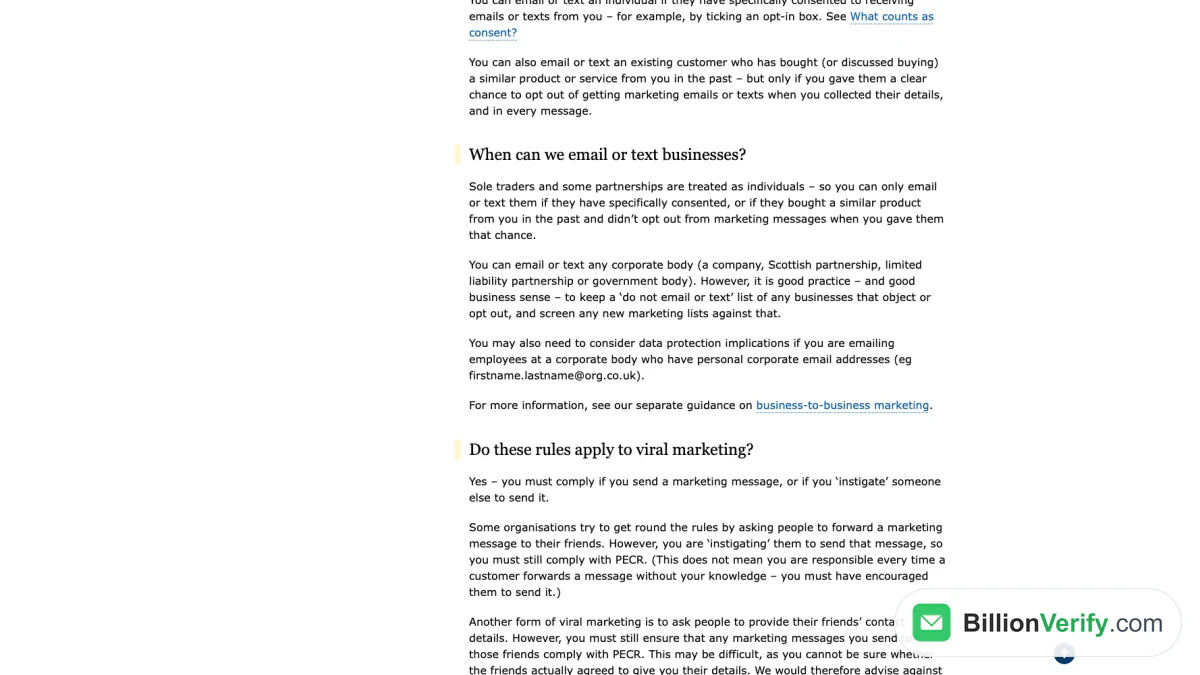
Screenshot: the ICO page that explains when a business may be emailed, captured in November 2026.
The second layer is data protection. Once you know the name of the person you are writing to, you are processing personal data, and the UK GDPR applies even in a business context. The ICO names consent and legitimate interests as the two lawful bases most relevant to B2B marketing, and legitimate interests requires a three-part test: identify the interest, show the processing is necessary, and balance it against the person's rights. If you collected the details from public sources or a third party, you must give privacy information within a reasonable period and no later than one month. The ICO also recommends keeping a do-not-email list of businesses that object and screening every new list against it.
European Union: GDPR and national ePrivacy rules
In the EU the answer depends on the country. Article 13 of the ePrivacy Directive requires prior consent for email marketing to natural persons and leaves the protection of companies to each member state's national law. As a result, the rules for business contacts vary between member states, so check the national regulator in every country you plan to email.
The General Data Protection Regulation applies on top. Recital 47 says using personal data for direct marketing may be regarded as a legitimate interest, which is the basis most B2B senders rely on. Article 21 gives every recipient an absolute right to object to direct marketing, after which you must stop using their data for it. That right must be brought to the person's attention at the latest in the first communication, presented clearly and separately from other information. Article 14 adds that, when the data did not come from the person, the information about where you got it and why must reach them no later than that first message.
Canada: CASL
Canada's anti-spam law asks for consent first, and it covers commercial email sent from other countries to recipients in Canada. The CRTC's CASL FAQ lists three requirements for a commercial electronic message: consent, identification of the sender and an unsubscribe mechanism. Without express consent, the most relevant route for B2B is the conspicuous publication exemption. It implies consent when the person published the address themselves, did not add a statement refusing unsolicited messages, and your email relates to their role. A third party that copies or sells published addresses does not create that consent, so a bought list of Canadian contacts does not qualify. The CRTC also expects you to keep evidence of how each contact detail was published.
Mailbox Provider Rules for Cold Senders
Laws set the floor, and Gmail, Yahoo and Outlook decide whether an email reaches the inbox. Since February 2024, Google and Yahoo have enforced sender requirements, and Microsoft announced similar rules for Outlook.com consumer domains in April 2025. A small cold program may never reach their bulk thresholds, but the spam rate limit applies to every sender, and a domain that crosses it struggles with every recipient.
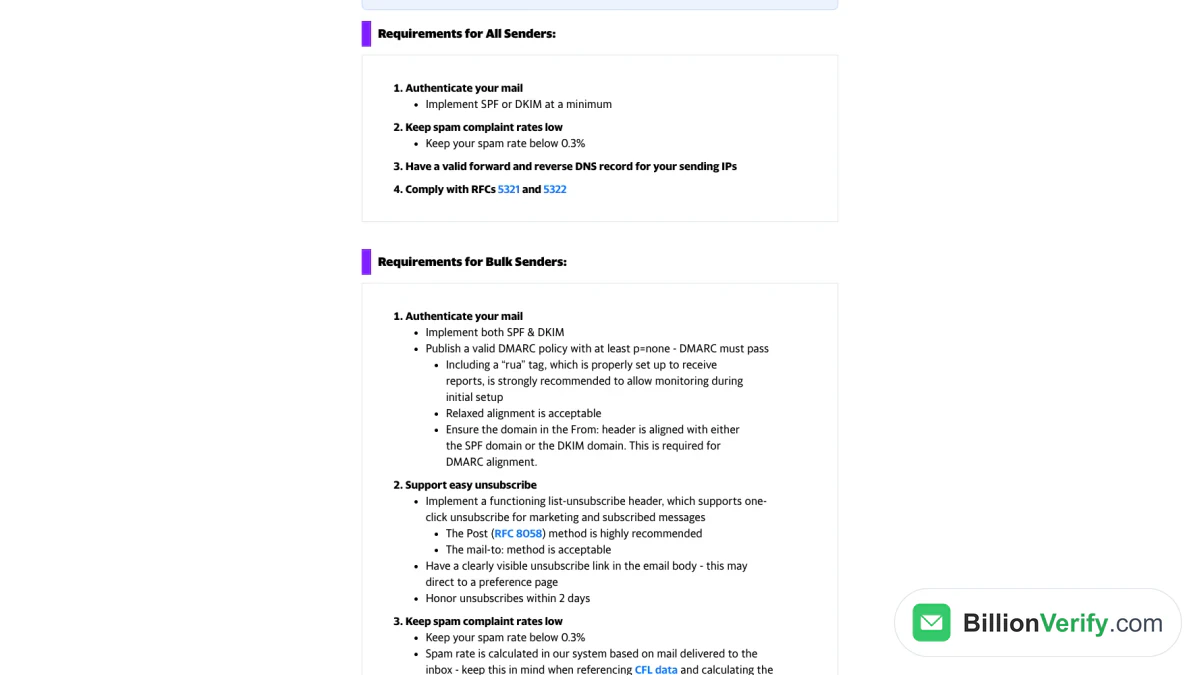
Screenshot: Yahoo's sender requirements, with the 2-day unsubscribe line for bulk mail, viewed in Nov 2026.
The table summarizes each provider's own page as read in November 2026. "Higher tier" means the stricter rules for large senders; Google and Microsoft draw that line above 5,000 a day, while Yahoo's page refers to bulk senders without a number.
| Requirement | Gmail | Yahoo Mail | Outlook.com |
|---|---|---|---|
| Spam rate ceiling, all senders | Below 0.3% in Postmaster Tools | Below 0.3% | No number published |
| Authentication, all senders | SPF or DKIM | Same as Gmail | Not stated below the higher tier |
| Authentication, higher tier | SPF, DKIM and DMARC, with p=none allowed | Both SPF and DKIM, plus a passing DMARC policy | Passing SPF plus DKIM; DMARC no weaker than p=none |
| Unsubscribe, higher tier | One-click for marketing and subscribed messages, plus a visible link | Working List-Unsubscribe header (RFC 8058 POST method recommended), visible link, honored in 2 days | Functional unsubscribe link recommended |
| Other checks | Valid forward and reverse DNS, TLS | Same DNS rule as Gmail | April 2025 update: failing mail rejected with 550 5.7.515 |
Google's page says more than its requirement. It advises keeping the spam rate below 0.10% and never reaching 0.30%, because a high rate leads to more spam classification and improvements take time to show. Microsoft's Outlook announcement lists list hygiene among its recommendations: remove invalid addresses regularly to reduce complaints, bounces and wasted messages. One-click unsubscribe itself is defined in RFC 8058, which requires two headers, List-Unsubscribe with an HTTPS address and List-Unsubscribe-Post: List-Unsubscribe=One-Click, both covered by a valid DKIM signature.
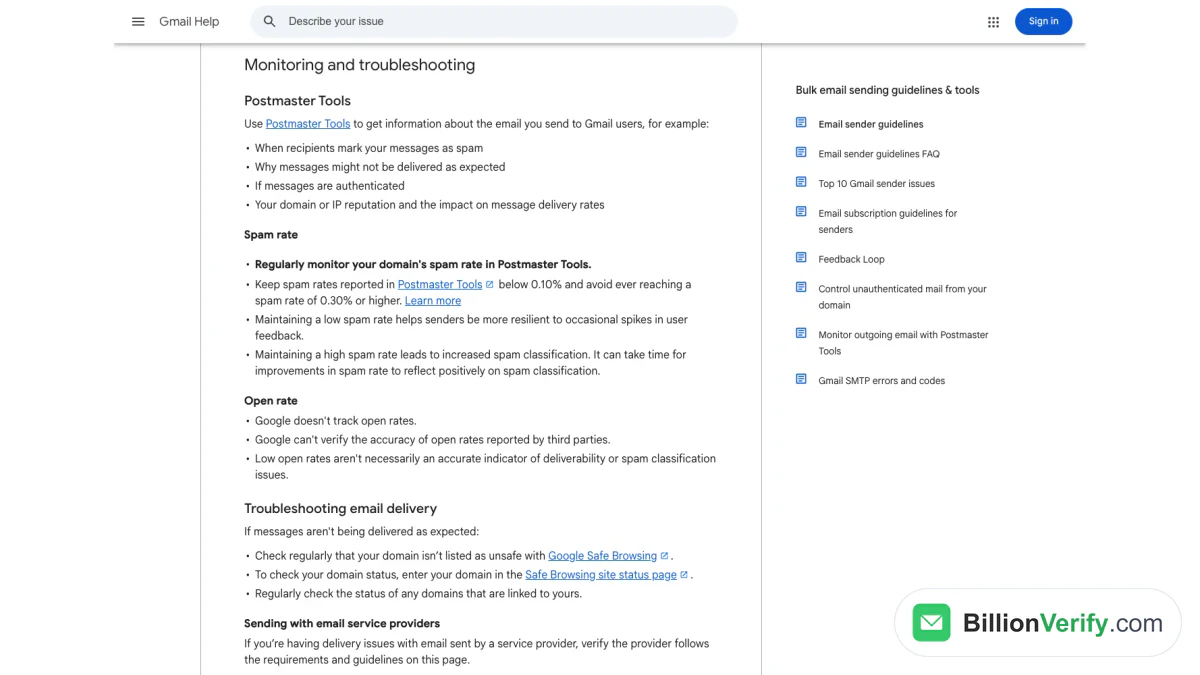
Screenshot: Google's monitoring advice, which pairs a 0.10% target with a 0.30% ceiling, as of Nov 2026.
Build a B2B Cold Email List You Can Defend
The list decides most of the outcome. A short list of people who clearly fit your offer is worth more than a long list of loose matches, because relevance drives replies and low relevance drives complaints. Start from an ideal customer profile: the industry, company size, region and technology that predict a good customer, then the role that owns the problem you solve. Write it down, because the profile also answers the legitimate interest question under the GDPR.
Sources and records
Good sources are ones you can explain to the recipient: the company's own website, a speaker list from an event the person spoke at, or a data provider whose terms allow outreach. For every contact, store the source, the date you collected it and the country. Those three fields answer an Article 14 notice, support a CASL conspicuous publication claim and let you honor a deletion request later. Contacts from LinkedIn Sales Navigator or a scraped directory often arrive without an email. In that case an email finder that returns a verified work address from a name and company domain avoids guessing patterns by hand; ours is available on paid accounts.
Verify every address before sending
Every list contains addresses that no longer work. People change jobs, companies rename domains, and data providers lag behind both. Under RFC 5321, a 5yz reply such as 550 is a permanent failure that should not be retried, and receiving servers read a stream of them as a sign of a careless sender. Because cold outreach goes to people who never confirmed their details, its bounce risk is higher than a newsletter's, and each bounce lands on the domain you will use for the rest of the campaign.
A verification pass checks each address before it reaches your sending tool. BillionVerify runs syntax, DNS, MX and SMTP checks, reports catch-all domains as their own category instead of calling them valid, and does not charge for unknown results. For a quick test of a single prospect, you can verify an email address for free; for a full file, bulk email verification takes a CSV and returns a status for each row. The free allowance is 20 credits for each day you use the account, up to 600 a month, with no credit card. Catch-all addresses deserve their own decision, and the catch-all verifier page explains why a server that accepts everything cannot confirm a mailbox. The cold email lead list quality article shows how to score a list before you send.
Two smaller checks help with doubtful records. A reverse email lookup shows what an unfamiliar address is connected to before you trust it, and a phone number validator confirms the numbers in your file if a call step follows the emails.
Set Up Sending for Cold Outreach
Your sending setup protects the reputation your customer mail depends on. Yahoo recommends separating email types by IP or DKIM domain, because each builds its own reputation. You can follow that advice by sending outreach from a subdomain or a separate domain that clearly belongs to the company, so a cold campaign cannot hurt invoices and password resets. It still has to identify you honestly; a lookalike designed to hide the sender would break the CAN-SPAM header rule.
Authentication comes next. Publish an SPF record and a DKIM key for the sending domain, add a DMARC record (p=none is the minimum Google, Yahoo and Microsoft accept), and make sure the From domain aligns with the SPF domain or the DKIM domain. Check that the sending IP has a matching PTR record, which hosted mailboxes from Google or Microsoft handle for you. Each record is explained step by step in the cold email deliverability walkthrough.
Volume is the last setting. Google Workspace lists a daily limit of 2,000 messages per user, 2,000 unique external recipients and 500 for trial accounts in its Gmail sending limits page. Those are ceilings, not targets: Google's sender guidelines say to increase volume slowly, and that the more you send, the more slowly you should raise it. Sending daily lets you grow faster than sending once a week. Start each new mailbox with a small daily batch, watch Postmaster Tools and replies, and raise volume only while complaints stay low.
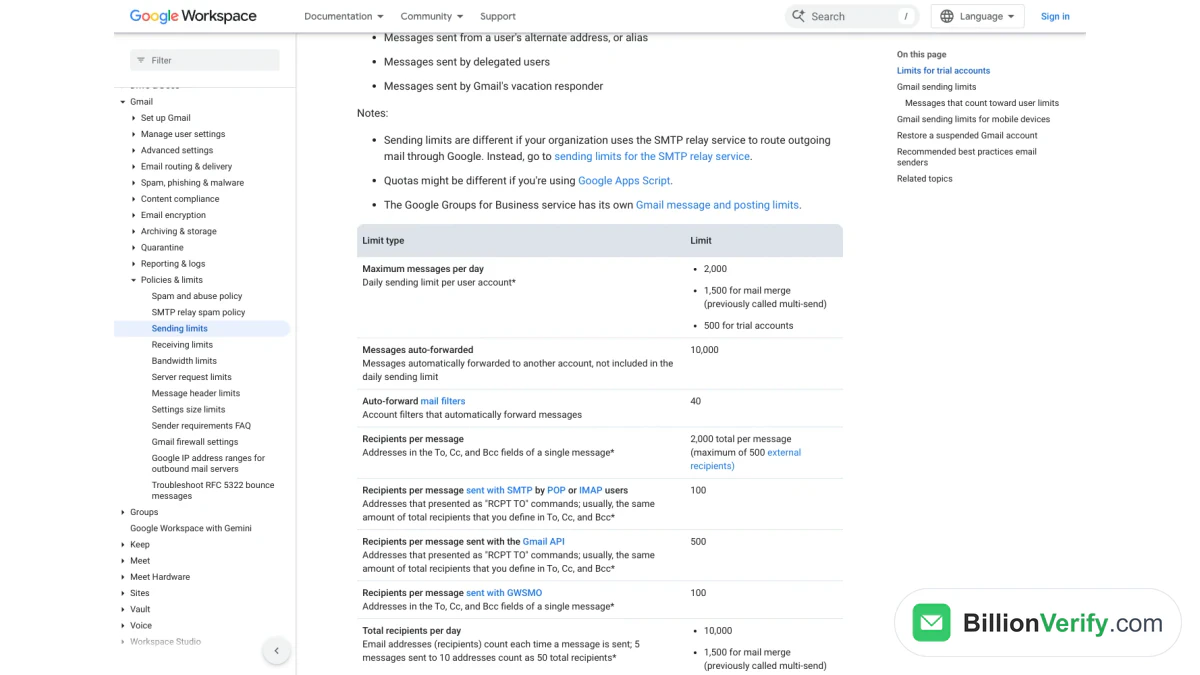
Screenshot: the Workspace sending limits table, with the 2,000-message daily cap and 500 for trials, checked in Nov 2026.
How to Write a Cold Email
A cold email has one job: earn a reply from a busy stranger. Keep it short enough to read on a phone, about the reader's problem, and ending in a single easy question. Everything else, including your company history and feature list, belongs in the second conversation. If you want ready-made structures, our cold email templates collect examples by situation.
Subject line
The subject line has to be honest before it is clever, because CAN-SPAM requires it to reflect the content. Short, plain subjects that read like something a colleague would send tend to work, such as the prospect's problem in a few words or the name of a shared event. Avoid a fake "Re:" or "Fwd:" on an opener. Google's guidelines call characters that imply a threaded conversation a deceptive display name practice, and a recipient who feels tricked reports spam. More examples sit in our cold email subject lines collection.
Opening line
The first sentence should be about the reader, not you. Mention something specific and recent that connects to your reason for writing: a product launch, a job post for a role your product supports, or a talk they gave. Skip "I hope this finds you well" and "My name is", which spend the preview text on nothing. If you cannot write a specific opening for a contact, that contact probably does not belong on the list.
Value and the ask
Follow with two or three sentences that link their situation to a result you can deliver, backed by something checkable such as a customer they would recognize or a short case study. Then ask for something small. "Is this a priority this quarter?" or "Would a two-minute video help?" is easier to answer than a request for a 30-minute call. Offering a menu of options only makes the reader do more work.
Signature and footer
The footer is where the legal rules live. Use your real name, title and company, give a postal address, and add a short line on how to opt out, such as "Reply 'no thanks' and I won't write again." That line, with the address, covers CAN-SPAM's unsubscribe duty, the GDPR notice about objecting to marketing, and the identification rules in PECR and CASL. CAN-SPAM also expects a plain statement that the email is an ad. A complete opener can look like this:
Subject: Bounces after your CRM migration
Hi Dana, I saw Northwind moved its sales team to a new CRM last month. Imports like that often carry old addresses across, and the bounces land on the domain your reps send from. We check lists before they reach the outbox, and [a customer Dana would recognize] ran its whole import through us before its first sequence. Is list quality on your plate this quarter, or should I ask someone else?
Sam Lee, Account Executive, Contoso Data, 100 Example Street, Springfield. This is a sales email; answer "stop" and you will not hear from me again.
Follow-Up Sequence and Timing
An opener is easy to miss or postpone, and silence often means busy rather than uninterested. A short sequence gives the reader a few chances to answer without turning into pressure. Each step should add something new, such as a resource, a different angle or a simpler question, rather than "bumping" the last email. Stop the sequence as soon as someone replies, opts out or bounces.
The table below shows a typical shape for a four-step sequence. It is a starting point to test, not a benchmark: the right gaps depend on your buyer, and enterprise buyers usually need more space between steps than small businesses.
| Step | Day | Purpose |
|---|---|---|
| Opener | 0 | The specific observation, the value and a question |
| Follow-up 1 | 3 | A new detail or a short resource tied to their situation |
| Follow-up 2 | 7 | A different angle, such as a second problem or a customer example |
| Closing note | 14 | A polite last email that leaves the door open |
Send each reminder in the same thread so the context stays visible, and repeat the opt-out line in every step. Watch the timing of replies as you go; if almost nothing arrives after the third email, the fourth adds complaints rather than meetings. More wording for each step is in the cold email follow-up article. Sequencing tools differ mostly in how they schedule, rotate mailboxes and stop on replies, and the cold email tools comparison covers those differences.
Cold Email Outreach for SaaS and Software Sellers
For software sellers, B2B cold email outreach works a little differently. Their buyers are often technical, they may already use a free tier or a competitor, and the product can sometimes prove itself faster than any email. That changes what the outreach should ask for.
For a product with a trial or free plan, the smallest useful ask is often a link to try a specific feature rather than a demo call. Signals from the product itself, such as several people from the same company signing up, make the best reason to write, as long as your privacy notice covers that use of the data. For an enterprise product, the outreach goes to fewer accounts and more people within each, so the list work and the research per contact grow, and the sequence slows down.
Objections in software sales are predictable, and the first email can answer the most common objection in a sentence. If the buyer likely uses a competitor, name the single difference that matters for their case instead of claiming to be better at everything. If they might build it themselves, mention the maintenance cost that teams tend to underestimate. When someone answers "not now", ask when their next planning cycle starts and put a reminder in your CRM instead of keeping them in the sequence.
Measure Reply Rate, Not Opens
Measure what the recipient did, not what a tracking pixel claims. The core cold email metric is reply rate: replies divided by delivered emails, with bounces removed from the denominator. Split it into positive replies, neutral replies and opt-outs, because a campaign with many replies that are mostly "stop" is failing. Track meetings booked and opportunities created from the same denominator, so you can see where the funnel leaks.
Open rate is no longer a reliable signal. Apple's Mail Privacy Protection prevents senders from seeing whether a recipient opened their email, and Google's own guidance states that Google does not track open rates and that low open rates are not necessarily a sign of deliverability problems. Tracking pixels and rewritten links can also make a plain cold note look more like bulk mail. Turning open tracking off and judging subject lines by replies removes that noise.
| Metric | How to calculate it | What it tells you |
|---|---|---|
| Bounce rate | Bounces ÷ sent | Whether the list was verified and current |
| Reply rate | Replies ÷ delivered | Whether targeting and copy earn attention |
| Positive reply rate | Interested replies ÷ delivered | Whether the offer fits the audience |
| Opt-out rate | Opt-outs ÷ delivered | Whether targeting is too broad or the cadence too pushy |
| Spam rate | Spam reports ÷ delivered, as Postmaster Tools reports it | Whether Gmail and Yahoo will keep accepting your mail |
We do not publish an average reply rate here, because the figures that circulate depend on whose data was counted, how replies were defined and which industries were included. Our summary of the Instantly cold email benchmark report shows how a single vendor's figures look; read them as data about that vendor's customers, not the whole market. Your own baseline, measured the same way each month, is more useful than any outside average. When reply rate falls, check bounces and spam rate first, then targeting, then the copy.
FAQs
What is the difference between cold email and spam?
Spam is bulk mail that nobody asked for, often with a hidden sender or a misleading subject. A cold email is written for one relevant reader, says who you are and lets that reader decline easily. Relevance alone does not make it legal, since a well-targeted email can still break CAN-SPAM without a postal address or an opt-out.
Does the GDPR allow B2B cold email?
The GDPR allows it when you have a lawful basis, usually legitimate interests, and when you stop at the first objection. You must also tell recipients where their data came from by the time of your first email. National ePrivacy laws sit on top and may require consent in some EU countries, so confirm the rule in each target country.
How many cold emails can I send per day?
A Google Workspace user can send up to 2,000 emails a day, but that is a technical ceiling, not a safe pace. New mailboxes should start with small daily batches and grow slowly as long as spam reports stay rare. Spreading volume across several mailboxes keeps each far below its limit.
Should cold outreach use a separate domain?
Using a separate domain or subdomain for outreach keeps any reputation damage away from the mail your customers depend on. Yahoo's advice to split mail types by DKIM domain supports the idea. The domain must still be fully authenticated and clearly connected to your company.
How many follow-ups should a cold email sequence include?
Three reminders after the opener, spread over about two weeks, are a reasonable starting point. Each should bring a fresh detail, and the sequence should stop the moment someone replies or opts out. Test the number against your own reply timing rather than copying a fixed rule.
Do cold emails need an unsubscribe link?
Every cold email needs a working opt-out under all four laws in this guide, and CAN-SPAM accepts a return email address as that way. One-click unsubscribe headers become a requirement at bulk volumes, such as Gmail's tier for its largest senders. Whatever method you use, honor requests quickly; Yahoo expects 2 days, and the CAN-SPAM deadline is longer.
Watch: How to Verify Snov.io Emails Before You Launch a Campaign
Watch: How to Get Verified Emails From LinkedIn Sales Navigator