




An email marketing strategy is a written plan that says who you email, why they should want it, what you send, and how you will know it worked. It sits above any single campaign. Subject lines and send times only pay off when the plan behind them is clear. This framework splits the plan into eight decisions you can finish in a few working sessions, and it ends with a 90-day rollout.
The rules that shape those decisions come from mailbox providers, regulators and standards bodies, and each was read at its own source while this guide was written. Vendor features are described from each vendor's help center. We have no connection with any company named here, and providers revise their rules often, so confirm the live source before you build on a number. BillionVerify is an email verification service, and the part on list quality explains where it fits.
Key facts (checked November 2026):
- Senders of more than 5,000 messages a day to Gmail accounts must set up SPF, DKIM and DMARC, offer one-click unsubscribe and keep spam rates below 0.30%, according to Google's sender requirements.
- Google's sender FAQ tells senders to stay under a 0.10% user-reported spam rate and never reach 0.30%.
- Microsoft's announcement for Outlook.com requires high-volume domains to authenticate with SPF, DKIM and a DMARC policy, with enforcement starting in May 2025.
- The FTC's CAN-SPAM guide, as listed in October 2026, sets penalties of up to $53,088 per violating message and requires you to honor an opt-out within 10 business days.
- Apple says its privacy feature for Mail stops senders from knowing when a user opens a message, so opens alone are a weak success measure.
What an Email Marketing Strategy Contains
Strategy answers why and for whom, while tactics answer what and when. Teams that start from tactics end up with a calendar full of sends and no way to say which ones mattered. A written email marketing strategy fixes that, because every later choice can be checked against it. If a campaign does not serve the goal and the audience named there, it does not get sent.
The framework has eight decisions, and the order matters. A goal limits which audiences matter, an audience limits which programs make sense, and the programs limit which tools you need. The table gives each decision, the question it answers and the output that belongs in your document.
| Decision | Question it answers | Output |
|---|---|---|
| Goal | What should email change for the business? | A primary goal and its baseline |
| Audience | Who receives it, and how do they differ? | Three to five segments |
| List growth | How do people join, and with what consent? | Signup points and a consent rule |
| Programs | Which emails run, and on what trigger? | A prioritized list of automations |
| Newsletter | What recurring promise do you make? | Cadence, pillars and voice |
| Tools | What do you need to run it? | Requirements written before any demo |
| Measurement | How do you judge it? | Three tiers of metrics |
| Testing | How do you improve it? | A test backlog and a review rhythm |
Set One Business Goal for Email
Email can support revenue, retention, lead development or customer success, and it cannot do all four equally well in the same quarter. Choose the goal that matters most right now and write it with a baseline and a date. A store may aim to lift repeat orders, a software company to move trial users to a paid plan, and a publisher to grow reader replies. That choice sets the order of your email marketing plan, so a vague goal produces a weak email marketing strategy.
A useful target states a number you can measure in your own reporting. "Improve email performance" cannot fail and cannot succeed. "Raise the share of new customers who place a second order within 60 days" can be tracked, argued about and fixed. Start from your current figure, since a number borrowed from another company's report says nothing about your audience.
Targets also cascade. A company target becomes a channel target, the channel target becomes a target for each automation, and each automation splits into campaign tasks. When the levels do not add up, the plan has a gap you can see before you spend money on it.
Know and Segment Your Audience
Demographic personas are the part of audience work that most teams overdo. A persona built from guesses about age and hobbies tells you little about what a subscriber will do in an inbox. Your own data says more: what they signed up for, what they bought, what they clicked and when they last engaged. Use a persona to name the problem a group wants solved, and use behavior to decide who gets which message.
Email segmentation turns that data into sendable groups. In Mailchimp's segment documentation, a segment is a set of conditions that filters contacts, and its own example targets people who joined in the last 30 days and have not yet purchased. Free and Essentials plans allow up to 10 conditions per segment, and Standard unlocks an advanced builder. Other platforms build segments from similar conditions, so the concept travels between tools. Our guide to email segmentation covers the mechanics.
Basic email segmentation starts with lifecycle and engagement, because they are easy to build and change what you send. The table lists a starter set and the first job of each group.
| Segment | How it is defined | First job |
|---|---|---|
| New subscribers | Joined recently, no purchase yet | Deliver the promised welcome |
| Active buyers | Recent purchase or product use | Support the next order or feature |
| Engaged non-buyers | Click often, have not bought | Answer the objection that blocks a purchase |
| Lapsed customers | Bought before, quiet since | Win them back with a reason to return |
| Dormant contacts | No engagement for a long period | Re-confirm interest, then suppress |
Rank the segments by value and effort, and build for the top two before touching the rest. A few well-run segments beat a dozen that nobody maintains.
Build the List With Permission
Email list building sets the ceiling for everything else. People join when the signup point promises something specific, so each form should say what they get and how often. Common signup points are a footer form, a content upgrade inside a useful article, a checkout checkbox, a lead magnet such as a checklist, and a pop-up shown after a reader has scrolled. Our guide on how to build an email list walks through them. Whichever you choose, collect the minimum: an address, plus only the extra fields you will actually use.
Confirm the Address Before You Mail It
Google's guidance gives the rule plainly: make sure recipients opt in, confirm each address before subscribing it, periodically check that people still want the mail, and consider unsubscribing those who never open or read. Double opt-in is the usual way to do the first two in email list building. Klaviyo's double opt-in article explains that a new subscriber must confirm before joining the audience, and that only confirmed people are queued for the welcome flow.
The trade-off is real. Confirmation filters out typos, bots and people who did not mean to join, but it adds a step that some genuine subscribers skip. Mailchimp's double opt-in help notes that some audiences with an EU primary address already use it by default. A pre-check of the typed address, such as a free tool that lets you run a quick check on an email address, catches obvious typos before the confirmation message goes out.
Know Which Consent Rule Applies
Permission is also a legal question, and the rules differ by region. In the European Union, Article 13 of the ePrivacy Directive allows direct marketing by email only with prior consent, with a narrow exception for a company's own similar products offered to existing customers who were given a free, easy way to object. The UK regulator applies the same logic. Its guidance on electronic mail marketing says you must not send marketing to individuals without specific consent, except for the soft opt-in for past customers.
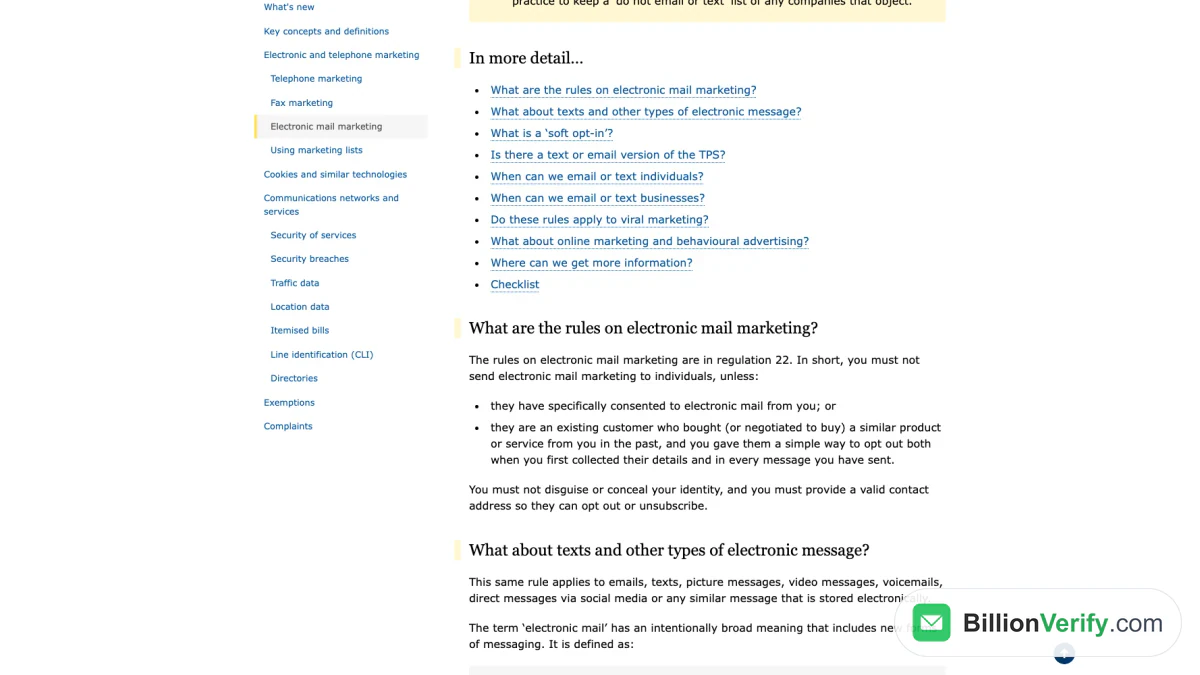
Screenshot: the ICO guidance stating the consent rule and the soft opt-in for existing customers, viewed in Nov 2026.
The United States takes a different route. The FTC guide asks for accurate header information, a subject line that matches the content, a clear label that the message is an ad, a valid postal address and a working opt-out that you must honor within ten business days. Build the strictest rule that applies to your audience into the signup flow once, instead of maintaining different flows by country. Our guides to GDPR email marketing and the CAN-SPAM Act cover each regime.
Map Automations to the Customer Journey
An automation is a set of messages that runs for a purpose, and the email marketing funnel is the order in which people meet them. A reader joins, gets a welcome, learns something useful, sees an offer, buys or does not, and then either stays or drifts away. Each stage needs a different message and a different measure of success. Mapping the journey first shows which email marketing funnel stage has no message, which is more useful than adding another broadcast to the calendar.
Automations start in two ways. Scheduled ones, such as a newsletter, go out on a date. Triggered ones start from something the subscriber did. Klaviyo's flow documentation separates flows triggered by events, such as an abandoned cart or a viewed product, from flows triggered by list membership, segment membership or a date property. That split is a good test for your own inventory: for each automation, name the trigger.
The table starts with the automations most teams need first and moves to the ones that add depth.
| Automation | Trigger | Job |
|---|---|---|
| Welcome flow | New confirmed subscriber | Deliver the promise and set expectations |
| Order or signup confirmation | Purchase or account creation | Confirm and build trust |
| Abandoned cart | Started checkout, no order | Recover a sale that stalled |
| Post-purchase | Days after an order | Ask for a review, suggest the next item |
| Browse follow-up | Viewed a product, no cart | Bring the visitor back |
| Win-back | No engagement for a set period | Reactivate, or stop mailing |
Build in that order. The first automation reaches everyone who joins, so it pays back first, and our welcome email sequence guide shows how to write it. Cart recovery and post-purchase flows come next for a store, while a software company would move onboarding to the front. Leave advanced work such as predictive timing for later, after the basics run reliably.
A sales sequence in your email marketing funnel follows a simple shape. It opens with a welcome, adds a few messages that are useful on their own, includes a transition that connects the problem to your product, and only then makes an offer. A closing reminder works when the deadline is real. Offers first fail for a plain reason: the reader has not yet seen a reason to trust you. Length depends on how long your buyers take to decide, so test it instead of copying a fixed count from an article.
Set a Newsletter Cadence You Can Keep
An email newsletter strategy starts from one fact: a newsletter has to earn attention on a schedule, with no trigger to give it a reason. It works when it keeps a single, specific promise. A reader should be able to say in a sentence what the issue gives them, and your signup form should say the same sentence. Our guide on how to start a newsletter covers the setup steps.
Content pillars keep the email newsletter strategy consistent. Choose three to five themes you can write about for a year, and rotate through them on a calendar. A software company might use deliverability, list health, strategy and customer stories. The calendar then becomes a short table that names the week, the theme and the supporting asset.
| Week | Theme | Main piece | Supporting asset |
|---|---|---|---|
| 1 | Strategy | Seasonal planning note | None |
| 2 | List health | How-to explainer | Blog post |
| 3 | Customer stories | Short case study | Landing page |
| 4 | Product | Update announcement | Video |
Cadence is the other half of any email newsletter strategy. Mailchimp's guide to open and click rates says some senders mail ten times a day and others once a quarter, and that sending more usually lowers engagement for each send, though it differs for every list. Pick a rhythm you can sustain through a busy month, then state it on the signup form. Consistency matters more than volume, because a missed issue teaches readers that the promise is optional.
In an email newsletter, voice and tone are separate. Voice is the personality that stays the same, such as knowledgeable and friendly. Tone shifts with the situation, so a welcome is warm while an error notice is plain and apologetic. Write both into a short style note so that a second writer can take over an issue of the email newsletter without breaking the pattern.
Choose Tools After the Strategy
Software should follow your email marketing strategy, not lead it. Write the requirements first: how many contacts you have, which triggers you need, what data must flow in from your store or CRM, how many people will work in the account, and what reporting you need. Then compare platforms against that list. Teams that pick a tool first often pay for features they never use and still lack the one trigger the plan needs.
An email service provider covers the editor, sending, automation, segmentation, testing and reports. Around it sit the data connections to your store and CRM, a deliverability monitor, and a verification step for the addresses you collect. Our email marketing software guide compares twelve platforms with prices read from their own pages, the free email marketing tools article covers entry plans, and ConvertKit vs Mailchimp compares two common starting points.
The criteria below are the ones that most often change the choice. They carry no weighting, since the right balance depends on your team.
| Criterion | What to check |
|---|---|
| Triggers and data | Can it start flows from the events your store or app produces? |
| Segmentation depth | Does your plan tier limit conditions or hide the advanced builder? |
| Pricing basis | Is the bill driven by contacts, by sends, or by both? |
| Deliverability support | Does it help with authentication and unsubscribe headers? |
| Fit with the team | Can the people who run it build a flow without a developer? |
Follow the Deliverability Rules
Deliverability is a strategy input, because the rules decide how large and how active a list you can safely run. Gmail and Outlook.com both set requirements for high-volume senders, and both treat authentication as the entry ticket. A good plan assigns an owner for the DNS records and a monthly check of complaint rates.
Google's rules separate all senders from bulk senders. Every sender needs SPF or DKIM, valid DNS records, a TLS connection and a spam rate under 0.30%. Bulk senders also need DMARC aligned with the From domain, and their marketing messages must support a one-click unsubscribe plus a visible link in the body. The FAQ adds the working target: below 0.10%, never 0.30% or higher.
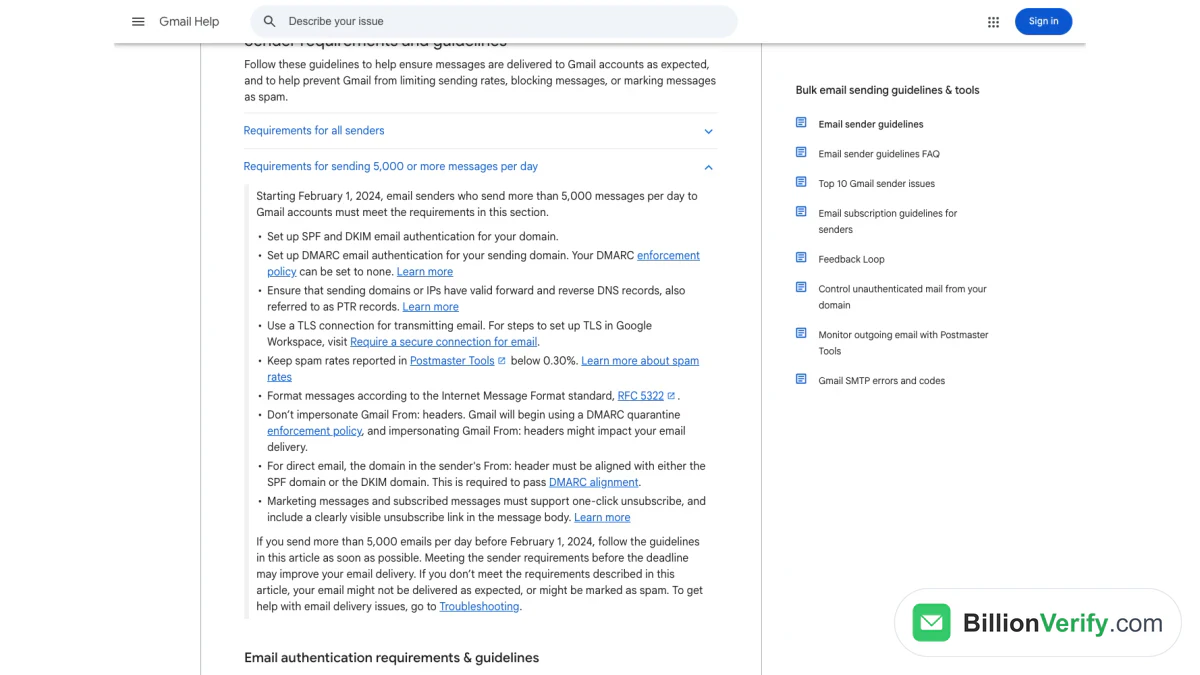
Screenshot: Google's section for high-volume senders with the unsubscribe and spam rate lines, as of November 2026.
Outlook.com's announcement follows the same pattern. It names SPF and DKIM as must-pass checks, asks for DMARC at p=none or stricter with alignment, and lists a functional unsubscribe link and regular removal of invalid addresses as recommended hygiene. The post's own FAQ suggests cleaning lists monthly or quarterly.
| Requirement | Outlook.com | |
|---|---|---|
| SPF and DKIM | Both required | Both must pass |
| DMARC | Required, policy can be none | At least p=none, aligned |
| Unsubscribe | Header-based plus visible link | Functional link recommended |
| Spam complaints | Below 0.30%, aim for 0.10% | Not stated as a number |
The header behind that unsubscribe line comes from RFC 8058. It exists because mail software sometimes fetches URLs found in headers and can trigger an unsubscribe by accident, so the standard adds a List-Unsubscribe-Post header that signals a safe request. Your platform usually adds both headers, but confirm it in a test message. Our email deliverability guide explains the monitoring side.
Measure Results in Three Tiers
Metrics work best in tiers, because different people ask different questions. Executives want revenue and customer value, managers want the health of each automation, and specialists want campaign detail. Report each tier to the people who use it, and do not let a campaign number stand in for a business result.
Business metrics are revenue attributed to email, customer value and cost to acquire. Program metrics are list growth net of unsubscribes, conversion, bounces and spam complaints. Campaign metrics are clicks, unsubscribes and, with care, opens. Mailchimp defines click rate as the share of delivered emails that registered at least one click, which makes it easy to compare across sends.
Opens need the most care. Mailchimp's help article warns that bot activity such as Apple's mail feature can falsely inflate opens and clicks, and Apple says the feature keeps senders from learning when users open mail. Google adds that it does not track opens and cannot verify the figures third parties report. Treat opens as a rough trend within one list and lean on clicks, conversions, revenue and complaints for decisions. Our guide to email marketing metrics lists the formulas.
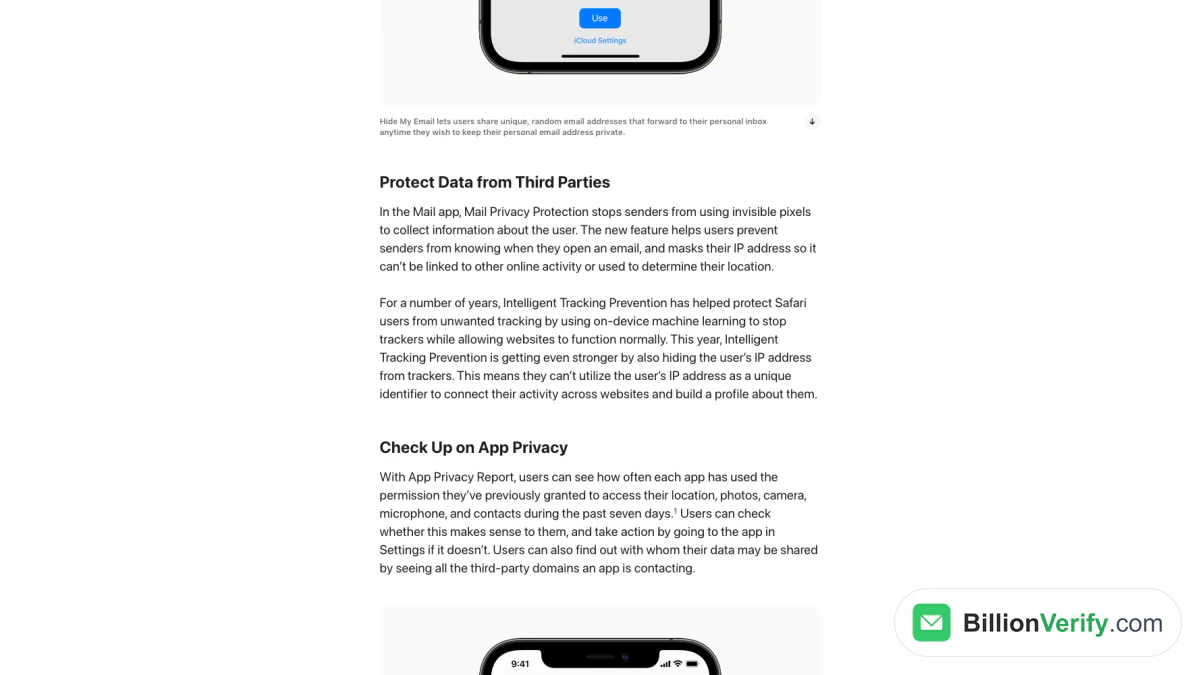
Screenshot: Apple's June 2021 newsroom passage on invisible pixels, read in Nov 2026.
Benchmarks deserve the same caution. Mailchimp publishes industry averages from its own customers, but the page states that the data was last updated in December 2023, so its benchmark report is a rough reference, not a target. Set your first target from your own baseline, then improve on it.
Test and Improve on a Schedule
Testing turns opinions into evidence, but only when each test asks one question. Write a hypothesis in a fixed form: changing this element from A to B should move this metric for this reason. Decide the sample, the metric and the end date before the send, and record the result whether it wins or loses. A short log saves you from repeating the same experiment a year later.
Mailchimp's A/B testing documentation shows how a platform structures this. An email test compares one variable at a time, chosen from subject line, From name, content or send time, with up to three variations. The winner can be picked automatically by opens, clicks or revenue, or manually from the report. Given the problem with opens above, clicks or revenue make the safer winner criterion.
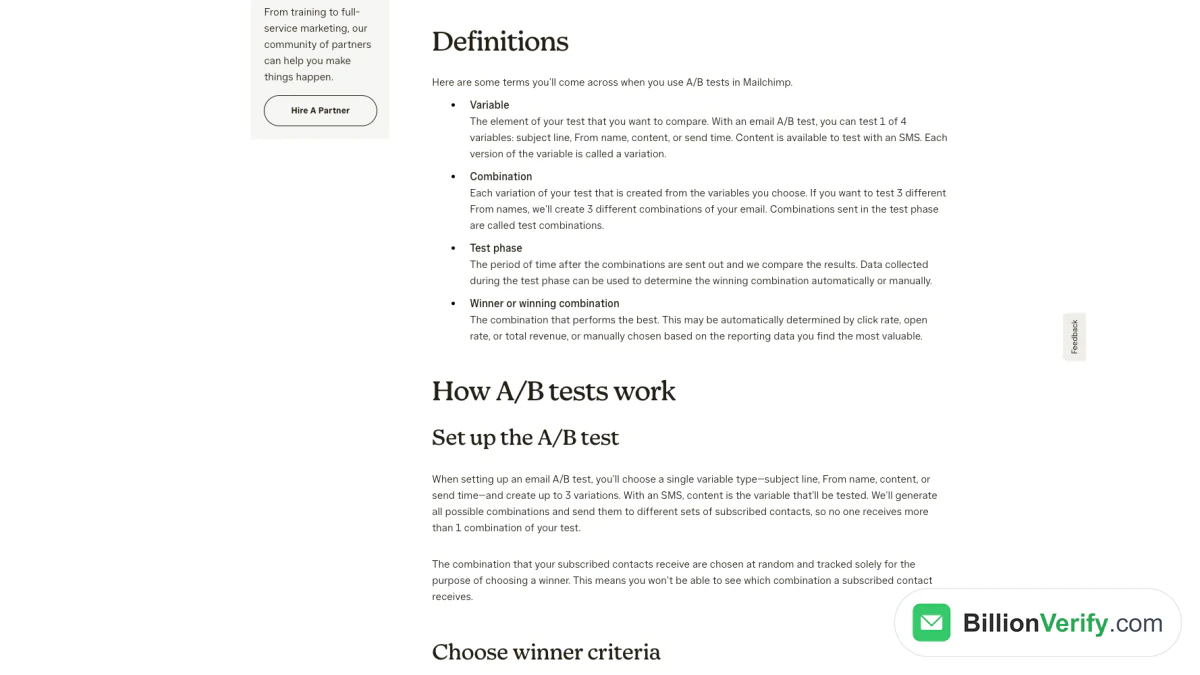
Screenshot: Mailchimp's help article defining test variables and winners, captured on 2026-11-21.
Spend testing effort where it can move the result. Offers, segments, timing and subject lines usually matter more than button colors or font choices. Our email testing guide ranks test ideas by likely impact. Review on a rhythm: a quick look after each send, a deeper analysis monthly, and a quarterly review that decides whether the goal in your document still holds.
Treat List Quality as Part of the Strategy
Email list building without verification lets addresses that do not exist produce false numbers. Bounces inflate your send counts, dead contacts raise bills on platforms that charge by contact, and complaints from real subscribers get lost among bad data. Mailchimp's bounce documentation separates hard bounces, which are permanent failures such as an invalid address, from soft bounces such as a full mailbox. It also says high bounce rates often come from stale audiences or addresses that were improperly entered or imported, and that internet providers do not publish their limits.
The same article is blunt about responsibility. Mailchimp states that it is not a contact cleaning service, and that importing old or invalid contacts can lead to complaints, undeliverable messages and unsubscribes. That applies to every platform: the sending tool handles bounces after the fact, but the plan has to prevent them. Microsoft's guidance for Outlook.com senders makes the same point when it recommends removing invalid addresses regularly.
Three checkpoints cover the life of a list. At capture, check the address as it is typed. At import, verify any file you did not collect through your own confirmed form. Over time, verify again before big sends and suppress contacts who stop engaging. A service such as billionverify.com tests syntax, DNS, MX records and the mail server's response for each address, reports catch-all domains as their own result instead of calling them valid, and charges nothing for unknown results. Files go through its bulk email verification tool, and the free email tools page lists free checkers.
Two supporting checks help with oddly shaped data. A reverse email lookup shows what is attached to an address you do not recognize, and a phone number validator confirms numbers before you add SMS to the mix.
A 90-Day Rollout Plan
Treat the email marketing strategy as unfinished until something runs. A three-phase rollout keeps the scope small and puts the highest-value automation in front of subscribers early. Each phase ends with something you can check, so you know when to move on.
| Phase | Work | Done when |
|---|---|---|
| Days 1 to 30 | Write the document, set up authentication, clean the list, launch the first automation | Welcome emails send and authentication passes |
| Days 31 to 60 | Start the newsletter, add cart recovery or onboarding, build two segments | Each flow has an owner and a trigger |
| Days 61 to 90 | Review results, run the first tests, add one more flow, set the quarterly review | A test log exists and next quarter is planned |
After day 90, repeat the cycle at a slower pace and update the email marketing plan. Add flows only when the existing ones are stable, and review the strategy whenever the goal changes. The document that held the plan in week one should also hold the decisions you changed and why.
Strategy Mistakes That Cost the Most
Most failed efforts share a handful of causes. The first is sending without a purpose, which usually shows up as a busy calendar with no stated goal. The second is guessing about the audience instead of reading engagement data, so every subscriber gets the same message. The third is buying a platform before writing requirements, which locks the plan into whatever the tool does easily.
Others come from habit. Teams chase volume because it feels productive, even though more sends tend to dilute attention. They skip measurement, then cannot say what worked. And they set everything up once and never revisit it, so a welcome written years ago keeps running with outdated claims. A quarterly review and a named owner for each automation prevent most of these.
FAQs
How do I create an email marketing strategy from scratch?
A first email marketing strategy fits in a single document. Start with one goal and a baseline, then define who you will email and why they should want it. Next, list the signup points and the consent basis, choose the first automations, and only then pick tools. Review it each quarter.
What should an email marketing plan include?
An email marketing plan covers the goal, the audience segments, how people join and consent, the automations with their triggers, the newsletter cadence, the tools you need, the metrics you will report and the testing rhythm. Add an owner and a date to each item so nothing is left open.
How often should I send emails?
Send as often as you can keep the promise made at signup. Mailchimp notes that sensible frequency varies widely by goal, and that heavier schedules usually cost engagement. Test cadence on a segment before you change it for the whole list.
Are opens still a useful metric?
They are useful only as a rough trend. Apple's feature hides real opens from senders, and Mailchimp warns that it can distort both. Judge campaigns on clicks, conversions, revenue and spam complaints instead.
Do I need DMARC for marketing email?
Yes, once your volume passes the daily threshold that Gmail and Outlook.com set, since both require it. Smaller senders only need SPF or DKIM at Google, but DMARC still protects your domain from spoofing and is worth setting up early. The policy can start at none.
How do I keep my subscriber base healthy?
Confirm new signups, verify imported files, and remove addresses that bounce or stay silent for a long time. Google advises sending only to people who want your mail and pruning those who never open. Check complaint rates in Postmaster Tools every month.