




The best email providers for most people are Gmail and Outlook, because both give a large mailbox at no cost and work on every device. Privacy-minded users usually pick Proton Mail or Tuta, which encrypt stored email so the company cannot read it. Small teams that want an address on their own domain often start with Zoho Mail, or pay a few dollars for Fastmail, Google Workspace or Microsoft 365. This guide compares nine email providers on storage, paid prices, custom domain support, privacy and fit.
Every number below comes from each company's own pricing page or help center, as read in November 2026. Plans change often, so confirm the live page before you sign up. We have no connection with any of these companies. BillionVerify is an email verification service, and the final section of this guide explains why you should clean up your address book before moving it to a new mailbox.
Key facts (checked November 2026):
- Google's storage help page says every Google Account includes up to 15 GB, shared across Gmail, Google Drive and Google Photos.
- Microsoft's Outlook.com storage article gives unpaid accounts a 15 GB mailbox that sits apart from their 5 GB of Microsoft cloud space.
- Yahoo's storage FAQ states that Yahoo Mail currently includes 20 GB with every account.
- Proton's plan overview gives Proton Free up to 1 GB of Mail storage and a send limit of 150 messages a day.
- Zoho's Mail pricing page lists a Forever Free plan for up to five users with custom email for one domain.
What an Email Provider Does
An email provider hosts your mailbox. It gives you an address, stores your messages on its servers, filters spam and lets you read the same email on a phone, a laptop or the web. Some services cost nothing and earn money from ads or upgrades. Others charge a subscription and promise no ads, more space or stronger privacy.
The phrase "email service provider" has a second meaning in marketing. There it describes the platforms that send newsletters and campaigns to subscribers, such as Mailchimp or Brevo. Those tools do not give you a personal mailbox. This article covers mailbox hosting only. If you need software for campaigns, read our email marketing software guide, which compares twelve of those platforms.
Most email providers fall into three groups. Consumer services like Gmail, Yahoo, GMX and Outlook.com give you an email address on the company's domain at no charge. Privacy-first services like Proton and Tuta encrypt what they keep and charge for extras. Business email hosting providers like Google Workspace, Microsoft 365, Zoho and Fastmail put your mailbox on your own domain and bill for each person.
How to Choose an Email Provider
The right choice depends on five questions. Each one narrows the list quickly, so it pays to answer them before you compare features.
Free or paid
An unpaid account is enough for most personal use. The four big free email account providers, Gmail, Outlook.com, Yahoo and GMX, each give at least 15 gigabytes without a subscription, which holds years of ordinary email. The catch is that these accounts show ads or upgrade prompts, and their support is mostly self-service. A paid tier buys more storage, no ads, extra addresses and, on business plans, a person to contact when something breaks. For a business, the main reason to pay is not storage. It is the right to use your own domain.
Custom domain email
An address like you@yourcompany.com looks more trustworthy than a webmail address, and it stays yours if you change hosts later. Custom domain email is a paid feature at almost all the email hosting providers in this guide. Google sells it through Workspace, Microsoft through its business plans, and Apple through iCloud+. Zoho is the exception, since its no-cost plan covers a domain for a team of five. Proton, Tuta and Fastmail include it only on paid tiers, and Fastmail's cheapest Basic plan leaves it out.
Privacy and encryption
Every major mailbox service encrypts email in transit. Google's help page on email encryption in transit says all Gmail messages use TLS automatically, and it shows a red open lock when a message arrives unencrypted. Transit encryption does not stop the host from reading stored email. Secure email providers go further. Proton describes zero-access encryption: a message between two Proton users is encrypted before it reaches the server, and one from another service is encrypted as soon as it arrives. Tuta says its encryption also covers subject lines, contacts and calendars. If privacy is your main concern, these two belong on your shortlist.
Storage and sending limits
Storage figures are not always what they seem. Google pools its allowance with Drive and Photos, so a phone backing up pictures fills the mailbox too. Outlook.com keeps the mailbox apart from cloud files, but attachments sit on the cloud side. Sending caps matter as well. Google's Gmail sending limits page says you may be blocked after more than 500 recipients in one message or more than 500 messages in a day. Those caps are fine for personal use and too low for bulk sending.
Migration cost
Moving mailboxes takes effort, so the cost of leaving matters as much as the cost of joining. Most hosts can import an old archive over IMAP, the standard protocol described in RFC 9051, but contacts, calendars and filters often need separate steps. Some services make the move easier. Proton's Easy Switch imports messages, calendars and contacts, and for Gmail it keeps new mail arriving in Proton after the import. Tuta's entry tier does not include email import at all. If you own your domain, the move is far simpler, because your contacts keep writing to the same address.
The Best Email Providers Compared
The nine services below run from the largest consumer brands to the privacy-first and business-focused options. Prices are in US dollars unless a company lists only euros. "Paid yearly" means the monthly figure for a plan you prepay for a full year, while a monthly price means you can cancel after any month.
Gmail and Google Workspace
Gmail is Google's webmail service, and it is also the mail app inside Google Workspace. A personal account counts Drive files and Photos against the same 15-gigabyte storage quota. Google says that once you go over, Gmail sending and receiving may be affected. Content may be removed if the account stays over quota for two years or longer, after at least three months' notice.
More storage costs little. Google's Google One plans list a Basic tier with 100 GB for $1.99 a month. Gmail on its own cannot host your domain. For that you need Google Workspace, where the Starter tier lists $7 for each user on a yearly plan, or $8.40 if you pay monthly, with 30 GB of pooled storage per user. The page says committing for a year saves 16 percent, and S/MIME encryption appears only on the Enterprise tier. Gmail suits anyone who already lives in Google's apps and wants a reliable email account without paying.
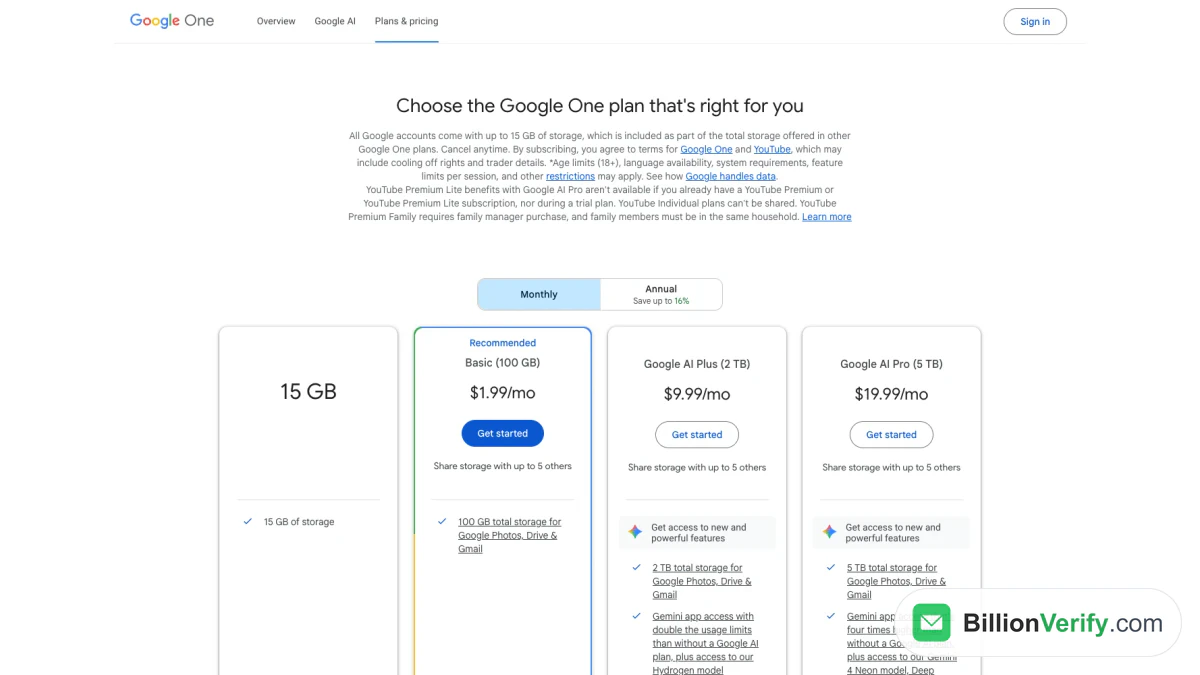
Screenshot: the Google One plans page with the Basic 100 GB tier at $1.99 a month, captured in November 2026.
Outlook and Microsoft 365
Outlook.com is Microsoft's consumer mailbox, with a 15-gigabyte quota of its own. That quota is separate from the five gigabytes you get for OneDrive files, although attachments count on the OneDrive side. Microsoft's help article says that Microsoft 365 subscribers get 100 gigabytes of mailbox space. That larger mailbox is not available during a trial.
The consumer subscriptions are priced on Microsoft's plan comparison page. Microsoft 365 Personal lists $99.99 a year or $9.99 a month, with a first-year offer of $69.99, and includes 1 TB of cloud storage. For your own domain, Microsoft's business plans page lists Business Basic at $7.00 for each user, paid yearly, with custom business email and a terabyte of OneDrive space per user. Microsoft's Exchange Online limits give Business Basic users the same 100-gigabyte mailbox that consumer subscribers get. Outlook fits people who use Word and Excel daily, and teams that already run on Microsoft.
Yahoo Mail
Yahoo gives every account 20 gigabytes, according to its storage FAQ. Yahoo Mail Plus raises that to 200 GB and adds an ad-free mailbox, more privacy controls and priority customer care. Yahoo also sells 100 GB and 1 TB storage plans, and the FAQ says that combining Plus with one of them reaches a total of 1.2 TB. Yahoo did not show prices for these upgrades on its public pages when we checked.
Running out of space has real consequences. The FAQ says you cannot send or receive new email until space is cleared, and messages sent to a full mailbox are lost. Yahoo's attachment help page limits all files in one message to 25 MB. Yahoo suits long-time users who want no-cost email and do not need their own domain.
iCloud Mail
iCloud Mail comes with every Apple Account and shares five gigabytes of iCloud storage with photos and backups. That allowance is the smallest among the large consumer services, so most heavy users pay. Apple's iCloud+ price list shows 50 GB for $0.99 a month, 200 GB for $2.99 and 2 TB for $9.99 in the US.
Every iCloud+ tier includes Custom Email Domain and Hide My Email. Apple's custom domain guide allows up to five domains, with as many as ten personalized addresses on each, and lets you share a domain with your Family Sharing group. That makes iCloud+ a cheap way for a household on Apple devices to use a family domain. It is a weaker fit for a business, since it lacks admin tools for a team.
Proton Mail
Proton Mail is one of the best-known secure email providers, and its company is based in Geneva, Switzerland. Messages between Proton users are end-to-end encrypted. Email from Gmail or other services is readable by Proton's servers on arrival, and then it is encrypted so only you can open it. Proton Free gives a single address and up to a gigabyte of storage, and it caps you at 150 sends daily. That storage starts at 500 MB and reaches the full amount once you finish a setup checklist.
Proton's Mail pricing page shows Mail Plus at $4.99 a month on monthly billing. On a 12-month plan it shows $29.88 for the first year, then $47.88 for each year after that. That tier gives 15 GB, 10 addresses and one custom domain. Proton Unlimited costs $12.99 when billed month to month and adds 500 GB and three domains. For a closer look at every tier, see our Proton Mail pricing breakdown. Proton suits journalists, lawyers and anyone who wants a mainstream app with strong privacy defaults.
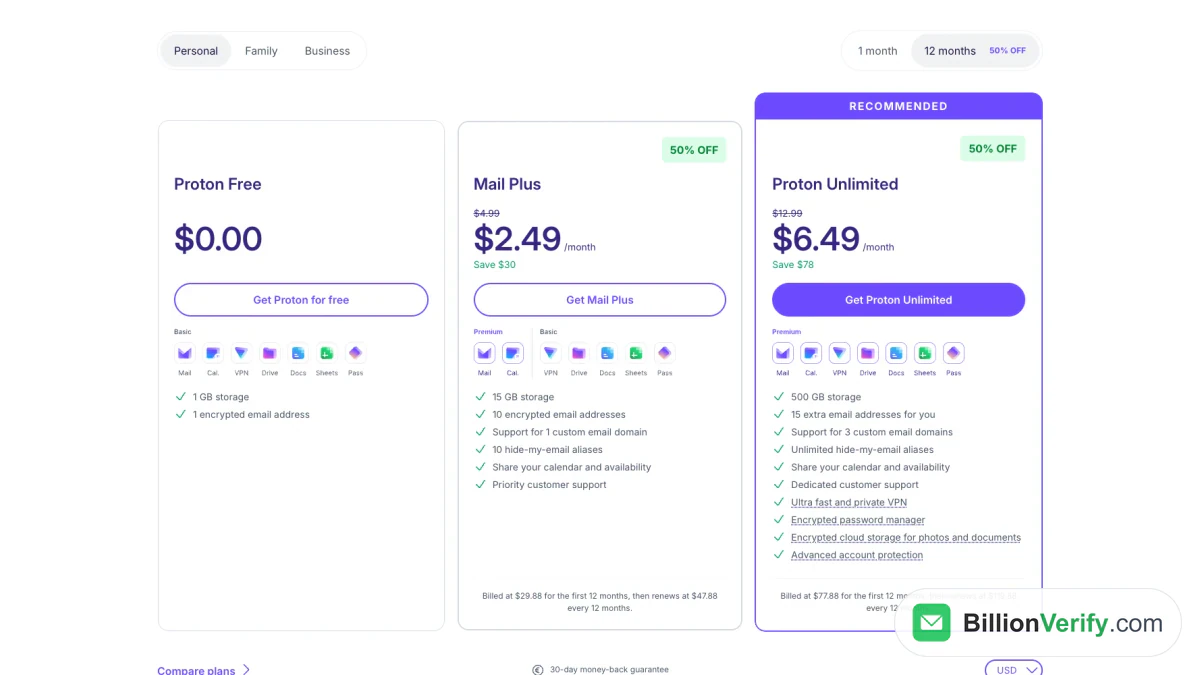
Screenshot: Proton's plans in the 12-month view during a sale, with 15 GB on Mail Plus and 500 GB on Unlimited, as seen during the November 2026 sale.
Tuta
Tuta, formerly Tutanota, is a German encrypted mailbox service. It says its end-to-end encryption covers emails, subject lines and attachments, plus the entire address book and calendar. It combines AES 256 with Kyber-1024, which it describes as a quantum-safe algorithm, and it keeps data in data centers in Germany.
Tuta's pricing page shows an entry tier with a gigabyte of storage, a calendar and three labels. That tier has no custom domains, no extra addresses and no email import. Revolutionary costs €3 a month, paid yearly, and adds 20 GB, 15 extra addresses and three domains. Legend costs €8 monthly on an annual subscription and includes 500 GB and ten domains. In November 2026 both paid tiers carried a promotion with 12 extra months. Tuta suits people who want their calendar and address book encrypted as well, and who do not need to bring an old archive.
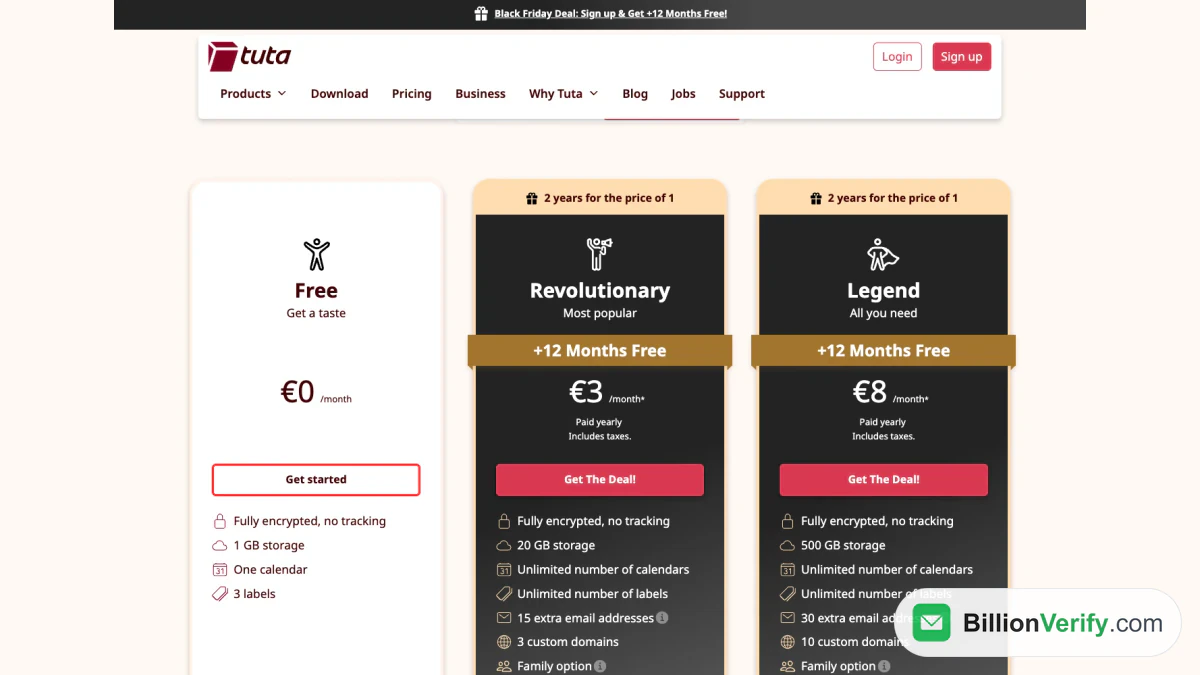
Screenshot: Tuta's plans at €3 and €8 a month paid yearly, captured on 21 Nov 2026.
Zoho Mail
Zoho Mail is a business mailbox service from Zoho, the company behind Zoho CRM. Its Forever Free plan supports up to five users with 5 gigabytes of storage each on a custom domain. That makes Zoho one of the few free email providers that offer custom domain email. The trade-off is access, since Zoho says IMAP, POP and ActiveSync are not included at that level. You read email in the web app or Zoho's mobile app.
Paid tiers are inexpensive. Mail Lite costs $1 for each user monthly, billed annually, with 5 GB, and a 10 GB version costs $1.25. Mail Premium costs $4 a head on the same annual terms, with 50 GB. The unpaid seats do not carry over, so moving up means paying for everyone. Zoho suits a small business that wants a professional address on a very tight budget.
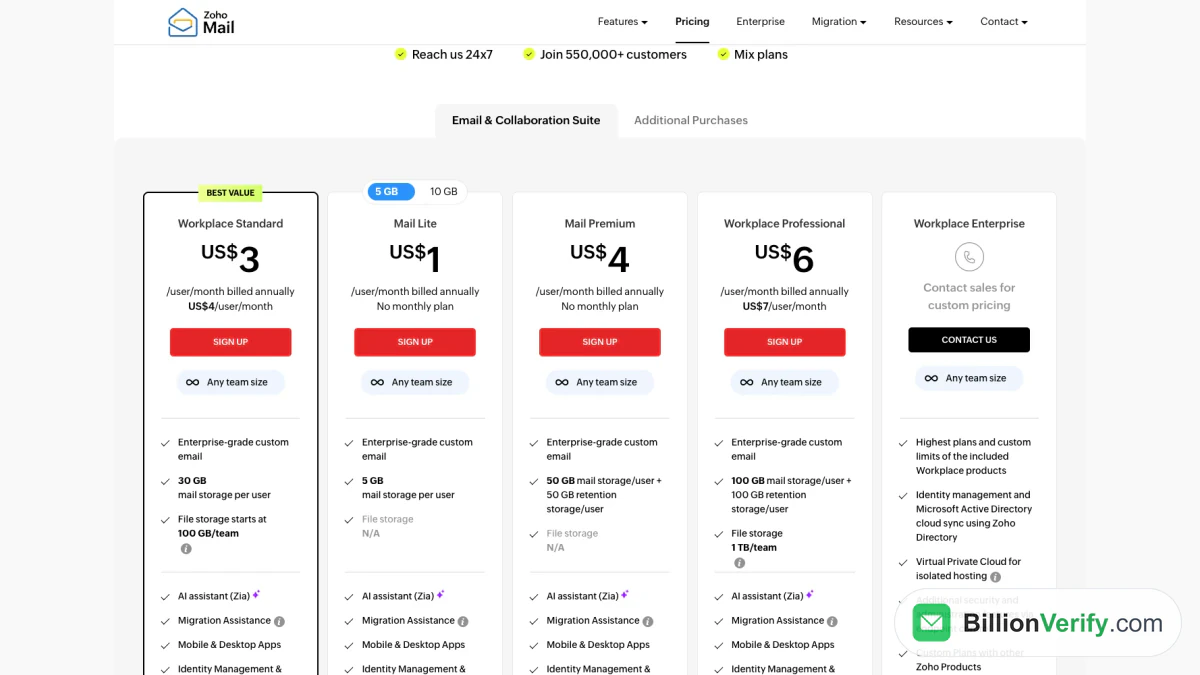
Screenshot: Zoho Mail's plans with Lite at $1 and Premium at $4 per user a month, billed annually, taken 21 Nov 2026.
Fastmail
Fastmail is a paid-only mailbox service with no ads and no unpaid tier. Fastmail's plans page offers a trial of up to 30 days. The Individual plan costs $5 a month on annual billing ($60 a year) or $6 month to month, with 60 GB and support for your own domain. Duo and Family plans share space among two to six people.
For teams, Fastmail sells Basic at $3 a seat with a yearly commitment, with 6 GB and no domain support. Standard costs $5 a seat on annual terms with 60 GB, and Professional costs $9 with 150 GB. Fastmail is for people who want an ad-free mailbox on their own domain, and who are happy to pay for it.
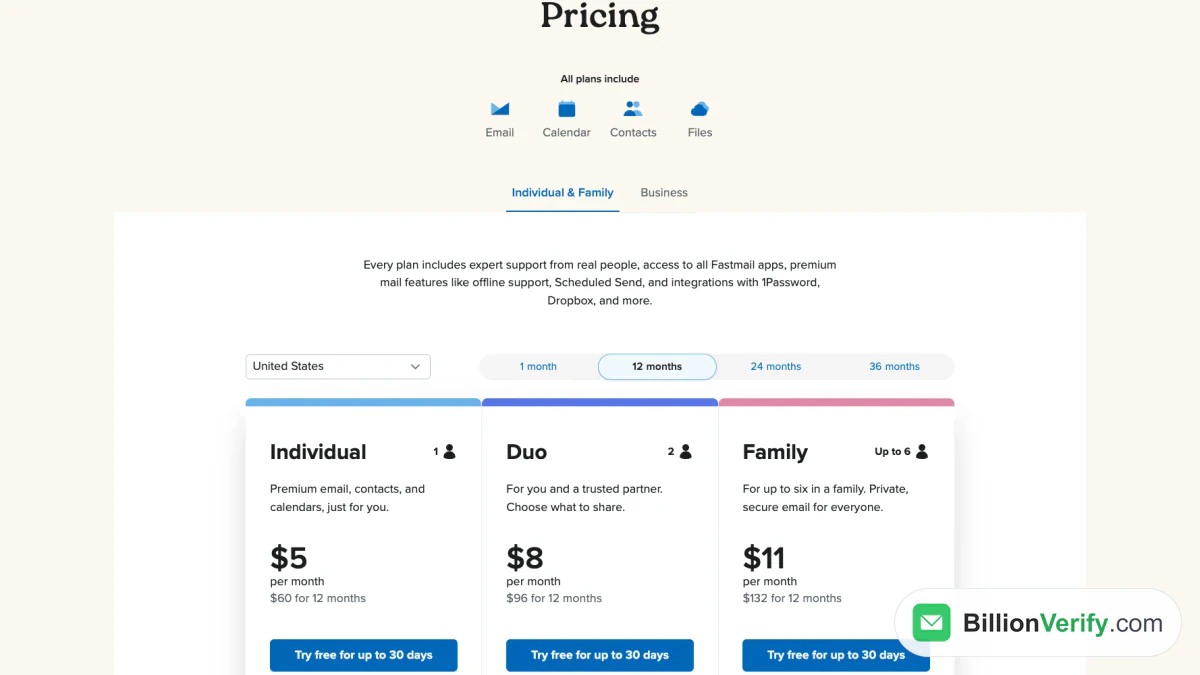
Screenshot: Fastmail's Individual plan at $5 a month on a 12-month term, with a 30-day trial, dated 21 Nov 2026.
GMX
GMX is a webmail service with an English-language edition. Its GMX Mail page offers 65 gigabytes of storage at no cost, attachments as large as 50 MB and ten alias addresses. The site also describes PGP features for encrypting individual messages. GMX does not list a paid plan on that page. For a direct comparison with Google's service, see our GMX vs Gmail guide. GMX suits users who want a large mailbox and a few aliases, and who are fine with an ad-supported service.
Comparison Table
The table puts the main numbers side by side. "Free storage" is the allowance without a subscription, in gigabytes. "Paid from" is the lowest listed price for the smallest paid tier, with its billing term, and "Own domain" names the plan that allows one.
| Provider | Free storage (GB) | Paid from | Own domain | Best for |
|---|---|---|---|---|
| Gmail | 15, pooled with Drive and Photos | $1.99 a month (Google One) | Google Workspace, $7 each, billed yearly | Google app users |
| Outlook.com | 15 for messages, plus 5 for cloud files | $9.99 a month (Personal) | Business Basic, $7.00 a user paid yearly | Office users and teams |
| Yahoo Mail | 20 | Not shown publicly | Not covered in its help pages | Long-time users |
| iCloud Mail | 5, shared with iCloud | $0.99 a month (iCloud+) | Any iCloud+ tier | Apple households |
| Proton Mail | Up to 1 | $4.99 a month (Mail Plus) | Mail Plus and higher | Privacy |
| Tuta | 1 | €3 a month on a yearly plan | Revolutionary and higher | Encrypted contacts and calendar |
| Zoho Mail | 5 per user, up to five users | $1 a user, billed annually | Included at no cost | Small business on a budget |
| Fastmail | None, 30-day trial | $3 a seat, yearly | Every plan except Basic | Paid mailbox without ads |
| GMX | 65 | No paid plan listed | Not offered on that page | Large no-cost mailbox |
Which Provider Fits Which Need
No single service wins every category. The pairings below match a common situation with the companies whose published terms fit it best.
Best free email providers for personal use
Gmail and Outlook.com are the safe defaults, with apps on every platform. Of the free email account providers here, GMX gives the most raw storage, and Yahoo now offers more than either of the big two. If you back up many photos with Google, remember that its quota is shared, so Outlook.com's separate mailbox may last longer. In the end, the right pick is usually the one that matches the phone and apps you already use.
Best email providers for privacy
Proton and Tuta are the clear picks among the best email providers for privacy. Both keep your archive encrypted at rest, and both offer an unpaid tier to try. Proton is easier to adopt because Easy Switch imports from Gmail and keeps syncing. Tuta lists subject lines among the data it encrypts, but its entry tier cannot import old email.
Free email with custom domain on a small budget
Zoho's no-cost tier is the cheapest route, since it costs nothing for five people on one domain. iCloud+ adds custom domain email for a household from under a dollar a month. Fastmail's Individual plan and Proton's Mail Plus each cost about $5 monthly and include a domain with a privacy or ad-free focus.
A business team
Google Workspace and Microsoft 365 are the standard email hosting providers for teams. Both list $7 for each person on their entry plans when billed yearly, while Google charges $8.40 for a single month, and both add admin controls, shared calendars and office apps. Pick the one whose documents and chat your team already uses. Zoho and Fastmail are lighter alternatives for teams that only need email.
Check Your Contacts Before You Switch
Changing services is a good moment to clean your address book. Over years, contacts change jobs, abandon old accounts or close their domains. Once you start sending from a new mailbox, those dead addresses bounce, and a run of bounces tells receiving filters that the sender may not be careful. That matters even more on a custom domain, because your domain's reputation follows you to the new host.
Before you import a contact list or announce your new address, run any address you are unsure about through a free email address checker. When you want the full SMTP test on a single contact, you can verify an email address for free, and a whole contact file can go through bulk email verification. BillionVerify runs syntax, DNS, MX and SMTP checks, reports catch-all domains as their own category instead of calling them valid, and does not charge for unknown results. You get 20 credits on each day you use the service, up to 600 a month, with no credit card. Our guide to what a hard bounce is explains why permanent failures hurt more than temporary ones.

Two other checks help when you tidy a contact list. A reverse email lookup shows what an unfamiliar address is linked to before you reply. A phone number validator confirms that the numbers saved with your contacts still work, which helps if you use them for account recovery or texts.
FAQs
Which email provider is best for most people?
Gmail and Outlook.com suit most people, because both cost nothing and work with every phone and computer. Choose Gmail if you use Google Docs and Drive, and Outlook.com if you use Word, Excel and Windows. Either one lets you upgrade later without changing your address.
What are the best free email providers?
The best free email providers are Gmail, Outlook.com, GMX and Yahoo Mail for everyday use, and Proton or Tuta when privacy comes first. Zoho is the pick for a business address that costs nothing. Compare the storage and sending caps in the table above before you choose.
What are the most secure email providers?
Tuta and Proton are the secure email providers most people name first, because both keep stored messages encrypted with keys the company does not hold. Proton is based in Switzerland, and Tuta keeps its data in Germany. Mainstream services such as Gmail protect messages in transit with TLS, but the provider can still process what it stores.
Can I get free email with custom domain hosting?
Yes, Zoho hosts a domain you own for up to five users without charge, although that tier leaves out IMAP and POP access. Fastmail, Tuta, Proton, Apple, Microsoft and Google all charge for this feature. The domain name itself is bought separately from a registrar.
Is it worth paying for email?
Paying makes sense when you want your own domain, more storage, email without ads or support from a real person. For a personal address with ordinary use, the unpaid tiers are enough. Businesses usually pay one of the email hosting providers, since a domain address and admin controls are worth a few dollars per person.
How do I move my email to a new provider?
Most services pull old email from your previous mailbox over IMAP, and some add one-click tools such as Proton's Easy Switch. Export contacts and calendars separately if the tool does not move them. Then set up forwarding from the old account and tell your contacts about the new address.
Do email providers limit how many messages I can send?
Yes, every no-cost service caps daily sending to stop spam. Gmail may block you after 500 messages in one day, and Proton's entry plan allows 150. For newsletters to large lists, use a dedicated marketing platform instead of a personal email account.
Watch: How to Verify an Email Address Is Real Before You Send
Watch: Bulk Email Verification: How to Verify an Email List From a File